
Updated: Sep-2026
Introduction
If you have been studying SEO for some time, you may already be familiar with the popular statement about how Google takes into account over 200 ranking factors.
And the recommendation stops here.
All of a sudden, you are supposed to optimize your title tags, boost your site’s Core Web Vitals, build links, create more content, use schema markup, update your outdated content, make pages load faster, work on internal links, and stay up-to-date with all Google algorithm changes.
This poses a significant problem for people who blog, do affiliate marketing, freelance, or run small businesses.
Most of us don’t have endless amounts of time, endless budgets, or an SEO team working behind the scenes for us. Each minute that is wasted on fussing over one small detail is a minute not spent developing quality content.
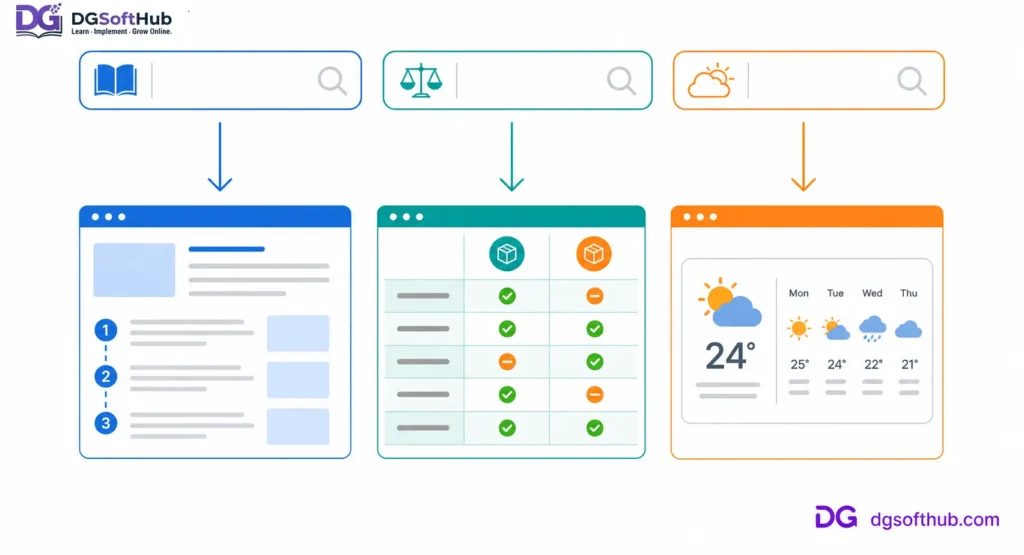
Google ranks pages based on search intent. Every query requires a different kind of content like guides, comparison pages, or straight answers.
Therefore, it’s not the right question to ask:
What are the ranking factors for Google?
But rather:
Which ranking factors should I pay attention to first?
The thing is:
Not all ranking factors carry the same weight.
Modern SEO is not about ticking off hundreds of boxes. Rather, it is about crafting a website which will always beat others in addressing visitors’ queries.
Useful websites generally beat non-useful ones which happen to be highly optimized for SEO.
This is good news.
What it means is that you do not need to know every trick in SEO in order to develop lasting search traffic. Rather, you just have to work on things that really count.
In this article, we are going to discuss 30 SEO signals which are important in 2026, why each of them requires your attention, and some outdated notions which you no longer have to bother yourself with.
If you are planning to develop a website, whether a blog, an affiliate one, or any other kind, this is where you should be focusing your efforts.
Google’s Actual Ranking Systems
The biggest myth in search engine optimization is that Google has an ultimate list. Follow everything and you’ll be on top.
It’s not true.
Google’s ranking systems take into account a huge number of signals in order to provide just one answer:
Which page is most likely to serve this user at the moment?
See how this answer does not include any of the following questions.
Which page contains the keyword most frequently?
Which page contains the longest article?
Which site uses the most SEO plug-ins?
Google’s goal is to connect people with the most efficient solution of their problem.
Imagine three different searches:
- “How to bake sourdough bread”
- “Best laptops under $1,000”
- “Weather in London today”
Every single search has a completely unique objective.
The first one would require a thorough guide.
The second one would require comparisons and buying tips.
The third one would need a quick response.
A website ranking high on one search may not rank high on another since the objective of both searches is different.
That is why the SEO approach today is not about optimizing each factor separately.
Successful websites have all the following four key advantages:
- They understand what people are actually searching for.
- They publish helpful, trustworthy content.
- They make that content easy for both users and search engines to access.
- They continue improving over time instead of treating SEO as a one-time task.
Everything else—technical optimizations, structured data, speed of the page, internal links, and backlinks—back up those more general goals.
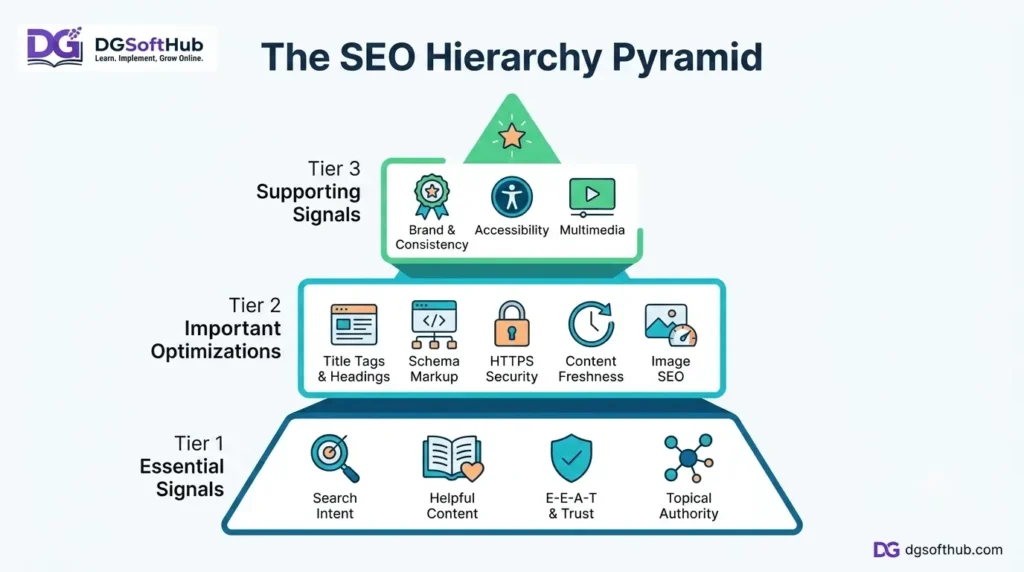
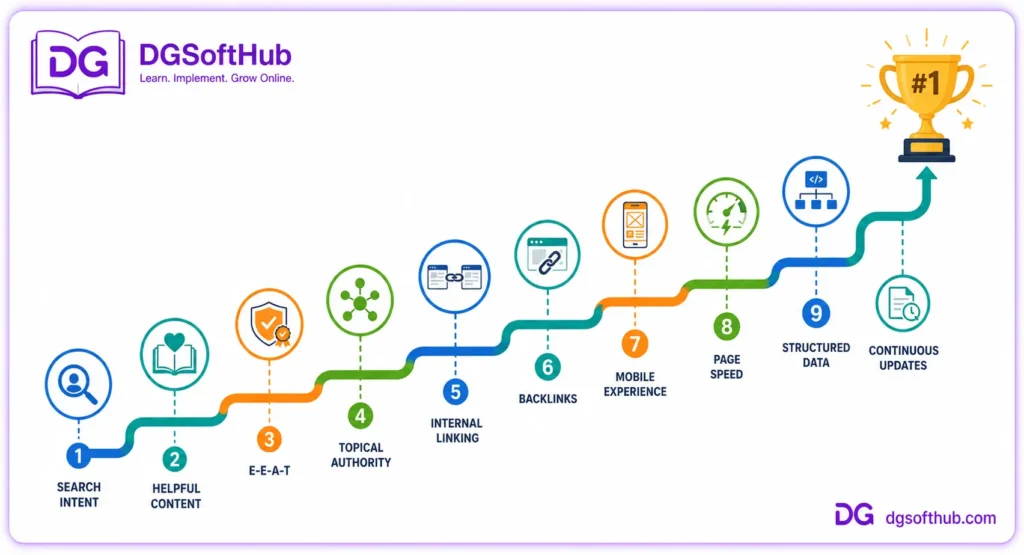
Throughout this guide, we will divide the 30 signals into three meaningful categories:
Tier 1: Essential Signals
The basics of each website that need to be fixed before advancing into any other type of SEO.
Tier 2: Important Signals
SEO optimizations that can make good content better and increase visibility.
Tier 3: Supporting Signals
Those minor tweaks that make a difference when all of the basics have been taken care of.
This strategy follows what is used by veteran SEO practitioners.
Rather than trying to optimize every element, they concentrate on optimizing those elements which are expected to make the website better in quality and usability.
That is exactly the attitude we will adopt in this article.
Tier 1: The Essential SEO Signals
If you only have a few hours each week to work on SEO, this is where you should spend them.
These aren’t flashy “growth hacks” or secret ranking tricks.
They’re the principles that consistently separate websites that grow steadily from those that remain invisible in search results.
Without these fundamentals, even the best technical optimization has limited impact.
Let’s start with the most important signal of them all.
Search Intent: The Difference Between Ranking and Being Ignored
Imagine someone searches for:
“How to Start a Blog.”
Here’s an example of two articles.
One takes 2,500 words on the history of blogging, the definition of a blog, and the reasons behind the popularity of blogging.
The other leads the reader from deciding on a niche to registering a domain name, choosing web hosting, installing WordPress, writing the first article, and promoting it once it’s been published.
Both these articles use the search query “how to start a blog.”
But only one is truly useful for the person doing the searching.
This is the power of search intent.
Search intent describes not just what someone types into Google, but also why they did so.
It’s about their goal or their desired outcome.
And this concept of search intent has changed SEO forever.
SEO used to be all about keyword matching and keyword optimization.
These days, Google does a pretty good job at knowing whether your page meets expectations.
If it doesn’t, then even stellar writing and SEO won’t be enough to rank highly.
The Four Types of Search Intent
Most searches fall into one of four categories:
Informational: The user wants to learn something.
Examples:
- What is SEO?
- How does Google Search Console work?
- What are Core Web Vitals?
Navigational: The user wants to reach a specific website or page.
Examples:
- Income Diary
- Google Search Console
- Ahrefs
Commercial Investigation: The user is comparing options before making a decision.
Examples:
- Best SEO tools
- Semrush vs Ahrefs
- Best web hosting for beginners
Transactional: The user is ready to take action.
Examples:
- Buy SEO course
- Hire an SEO consultant
- Download keyword research software
Recognizing the intent behind a keyword helps you choose the right format before you write a single sentence.
A Practical Exercise
Before creating content, search your target keyword in Google.
Study the first page carefully.
Ask yourself:
- Are the top results tutorials?
- Product comparisons?
- Opinion pieces?
- Lists?
- Videos?
- Official documentation?
Those patterns reveal what users—and Google’s ranking systems—currently consider the most helpful response.
Your goal isn’t to copy what’s already ranking.
Your goal is to understand why it’s ranking and then create something even more useful.
Common Mistake
Many beginners optimize for keywords instead of people.
They carefully place phrases in headings, titles, and paragraphs but forget to answer the actual question behind the search.
The result is technically optimized content that still leaves readers unsatisfied.
Key Takeaway
Don’t ask:
“How do I rank for this keyword?”
Ask:
“How can I become the best answer to this search?”
That single shift in thinking influences every other SEO decision you’ll make.
- Helpful Content: Stop Writing for Algorithms
But some time ago, there was a widespread notion that if you write enough and optimize your content properly enough, you will get good ranking sooner or later.
This recommendation was followed quite literally by many web resources.
And they kept creating articles, repeating the information available on other sites in order to create a high-volume content, hoping Google will notice that.
And they did.
For some time.
Now Google can easily distinguish between the content and the helpful information.
It matters greatly.
Consider that you need some instructions how to fix WordPress error and see an article that describes it in three unclear paragraphs and recommends purchasing premium plugin to solve your problems.
The cause of the issue is not explained there and no backup plan for if it doesn’t help is offered.
But imagine another article that explains the reason of this error, offers several options to deal with it, provides some screenshots, tells about pitfalls and what to do if the initial solution fails.
Of course, you will rely on it. And you may even share it with a friend having the same problem.
Helpful Content Solves Problems
Usefulness is not counted by the number of words used.
Usefulness is not calculated by keyword density.
Nor is it calculated by how many times the term SEO is mentioned in one paragraph.
It is determined by whether the reader leaves with the answer they sought.
Google official documentation: Google Search Central – Creating Helpful, Reliable, People-First Content
This could take up 700 words.
It could take up 3,000 words.
Whatever the right amount of words needed to answer the question fully.
A Quick Reality Check
Five basic questions to ask yourself before publishing an article:
- Would I bookmark that page?
- Would I recommend it to others?
- Did I answer my reader’s most important question?
- Did I provide anything valuable?
- Would that article be valuable next year?
When you have more “no” answers, keep working on your article.
Common Mistake
Too many people invest too much time into improving their heading and SEO but fail to ask if the article is helpful to anyone.
SEO can make good content better.
It will not save poor content.
- E-E-A-T: Why Trust Is Becoming More Valuable Than Tricks
Five basic questions to ask yourself before publishing an article:
Would I favorite that page?
Would I recommend it to someone else?
Did I answer the most important question that the reader had?
Did I offer any value at all?
Will this article still have value next year?
If you get lots of “No” for those questions, you still need to keep editing your article.
Most Common Mistake
Too many people put in too much effort on improving their heading and SEO without thinking whether the content is valuable to anyone.
SEO can help great content.
It cannot help bad content.
Official Google documentation: Google Search Central – E-E-A-T and the Search Quality Rater Guidelines
The four letters stand for:
- Experience
- Expertise
- Authoritativeness
- Trust
Notice that Trust sits at the center of everything.
Without trust, the other three become much less convincing.
Experience Matters More Than Ever
Say you are going through two reviews for an SEO software tool.
The first one repeats the feature list from the company’s website.
The second review describes how the reviewer worked with the product, how it succeeded, where it failed and which kind of site could use it to its full potential.
The latter sounds much more convincing since it is based on personal experience rather than copied content.
You don’t have to make up stories about your testing all possible tools and learning all the available strategies.
Being honest is always more valued than trying to sound overly knowledgeable.
Building Authority Through Being Transparent
Small but effective steps:
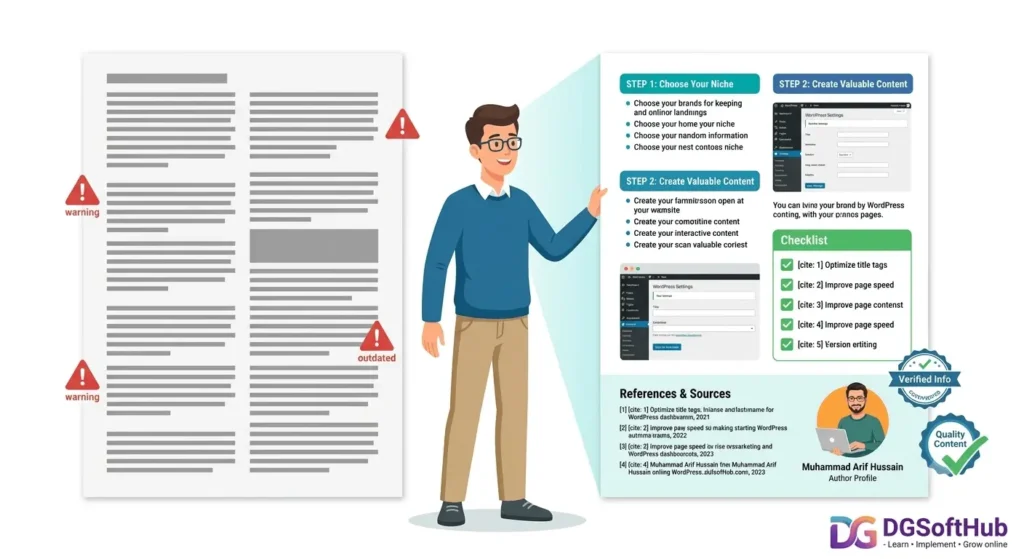
- Author’s biography.
- About section introducing your business.
- Working contacts.
- Sources for statistical facts.
- Explanations rather than exaggerations.
Consistency is the key to building authority.
Common Mistake
A lot of websites claim themselves being experts by making statements which cannot be proved.
Phrases such as:
“Guaranteed #1 Rankings in Google.”
or
“This secret SEO trick works after each algorithm update.”
usually ruin the website’s credibility.
Key Takeaway
People trust websites that teach—not websites that boast.
- Topical Authority: Become Known for Something
The best way to get lost both among people and among search engine robots is to write about all kinds of stuff.
Today it’s SEO.
Tomorrow it’s cryptocurrency.
Next week it’s gardening.
The following week it’s fitness supplements.
Although the articles may be written well, the website won’t develop its unique image.
Successful websites usually work differently.
Instead of covering a variety of topics, they become extremely useful regarding a particular sphere.
Take a look at the websites which you use.
You can understand precisely why you use them.
This website for photography.
Another for cooking.
And yet another for digital marketing.
That’s what makes a difference.
Build Content Based on Topics, Not on Keywords
Suppose you are developing an SEO website.
Instead of writing separate articles, make a whole library on topics like:
- Keyword research
- Search intent
- On-page SEO
- Technical SEO
- Link building
- Google Search Console
- Image optimization
- Internal linking
- Local SEO
These articles complement each other.
As a result, the website turns into a valuable resource rather than a bunch of isolated pieces of content.
Common Mistake
Posting arbitrary information only because of high search volume.
It is hard to build authority in such way.
Key Idea
It’s better to be one of the best websites in one niche than an average website in twenty different topics.
- Backlinks: Recommendations Still Matter
This happens every couple of years.
This prediction keeps being proven false time after time.
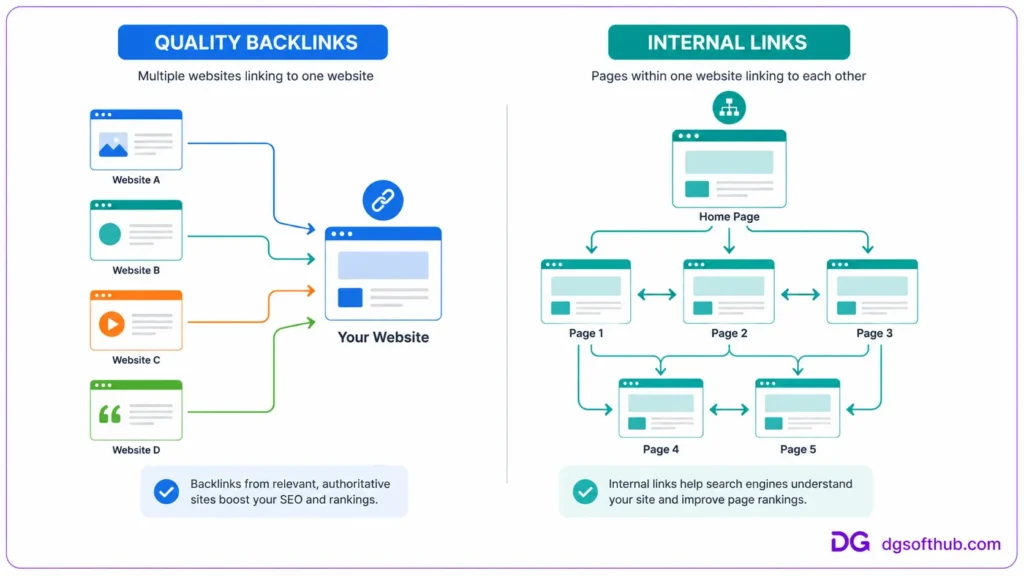
The reason is simple – backlinks remain important since they signal one important thing:
Recognition.
If another reputable website decides to link to your site or post, there is always a good chance that this is done for a reason – because they think it will add value to their audience.
Consider it as a professional referral.
Wouldn’t you prefer to listen to the opinions of experts in the field rather than some anonymous person?
This is how search engines think too.
All links are not created equal.
One carefully crafted editorial link from a reputable website carries more value than any number of links from directories or spammy networks.
Focusing On Earning, Not Accumulating Backlinks
The question is not about:
How many backlinks do I have?
It’s all about:
Why would they link to this page?
The most valuable backlinks come when people link to your content simply because it is worth mentioning.
It could be:
- Research.
- Tutorial.
- Template.
- Tool.
- Perspective.
- Guide.
Common Mistake
Buying hundreds of cheap backlinks.
Shortcuts often create long-term problems.
Quality almost always beats quantity.
Key Takeaway
Instead of asking how to build links, ask how to build pages that deserve links.
- Internal Links: The Most Underrated SEO Tool
As backlinks are a recommendation from another website, internal links are a recommendation from yourself.
These are the only ranking factors that are entirely under your control.
Still, they often get overlooked.
Here’s a quick illustration.
Let’s say you write an excellent guide on keyword research.
In case nothing else on your website refers to it, there will be less chances for it to be noticed both by readers and search engines.
What if all your articles on:
- SEO fundamentals,
- content marketing,
- search intent,
- blogging,
- and Google Search Console
are guiding readers to the guide?
Then you’ve built not just a set of separate pages but a network.
Proper internal linking enables visitors to keep learning without going back to Google for each of their questions.
Exactly the experience that any website should provide.
Create Content Hubs
Don’t treat each piece of content as a separate destination but make connections between related topics.
From one comprehensive guide visitors should move to the next one.
It is beneficial for everyone:
- the visitor learns more useful info
- search engines better understand your website’s structure;
- your expertise gets recognized.
Common Mistake
Putting dozens of internal links full of keywords because SEO plugin suggested them.
Each link should serve its purpose.
Otherwise, don’t put it anywhere.
Main Message
The perfect internal links answer the readers’ questions before they can even formulate them.
- Crawlability: Make It Easy for Google to Discover Your Best Work
What if you spend three days writing an impeccable article?
And then you post it.
And share it.
And absolutely nothing happens.
You have no traffic.
No impressions.
No rankings.
In such situations, it might be not the content itself but something else—that search engines cannot find or properly analyze your website.
For Google to properly analyze the website, it has to first find it.
This is why it’s crucial to have crawlability.
A well-structured website allows Google to have a clear pathway through pages of a website.
All key pages are interconnected.
Navigation is logical.
The links allow both users and Google to find valuable information.
Imagine how hard it is for Google to find a website with articles in the deepest categories with no links leading to them at all.
Improve Crawlability by Keeping Things Simple
Technical expertise isn’t required to make your content more crawlable.
Some simple measures include:
- Using proper site architecture.
- Submitting an XML sitemap via Google Search Console.
- Fixing internal link errors.
- Avoiding orphan pages.
- Having important content accessible with a few clicks from the homepage.
Simple changes in structure can lead to significant results in the future.
Popular Error
Updating content and failing to connect the new pages to the old ones.
If your readers cannot access the page, search engines won’t be able to do it either.
Bottom Line
Writing high-quality content is not enough.
It needs to be accessible to both humans and search engines.
- Mobile Friendliness: Your Website Doesn’t Rank on Desktop Alone
Consider the last five times you’ve performed a Google search.
It’s likely you used your phone.
Now picture arriving at a website where all text is minuscule, buttons cover one another, pictures run off the edge of the screen, and you need to pinch and zoom to see anything.
How long will you stick around?
Not long at all.
Google gets that.
That’s why mobile version of your website isn’t an add-on any more—it’s the important version.
Google Documentation Officially States:
The best-designed desktop site will never make up for a terrible mobile experience.
Good Mobile Design Isn’t Hard To Do
There’s this common misconception that a mobile optimized website needs a complete redesign.
The reality is, most successful mobile websites do these few simple things:
- Text is easy to read without zooming.
- Navigation is clear.
- Buttons can be clicked without difficulty.
- Pictures resize nicely.
- Pages are fast on mobile internet connections.
- Pop-ups aren’t hiding your content.
None of this was done just for the sake of SEO.
It was done to make your users’ lives easier.
A Simple Test
Visit your own website on your mobile device.
But not from the perspective of the website owner.
From the perspective of first-time user.
Can you instantly answer these questions:
- Where am I?
- What is this page about?
- What am I supposed to do now?
If your answers don’t come naturally in a few seconds, there’s room for improvement. Google Search Central – Mobile-First Indexing Best Practices
One Common Mistake
There are websites which are technically mobile responsive but hard to navigate.
Mobile responsive means they adjust to fit different screen sizes.
Good mobile usability means that experience isn’t hard to manage.
Those are two completely different concepts.
Key Point
Don’t optimize for devices.
Optimize for people who use those devices.
- Page Experience: Make Your Website Pleasant to Use
Imagine two bookstores.
The first one is neat, nicely arranged, and easy to browse.
The second one has books thrown around the floor, weird signage, tight aisles, and commercials popping up every few minutes.
Both of these bookstores offer the exact same selection of books.
Which one would you prefer visiting?
This works the same way for websites.
People never evaluate content in isolation.
They consider everything that surrounds it.
Page experience is not just one single ranking factor.
It is a sum of the design elements that impact user experience.
Page Experience Should Include
- Clear navigation.
- Readable typography.
- Consistent spacing.
- Logical page structure.
- Few distractions.
- Safe browsing.
- Quick loading speed.
- Stable page.
There are many things that are absent from this list.
Animations.
Effects.
Auto-played videos.
Pop-ups that show up every thirty seconds.
These things often make impression on website owners much more than on visitors.
Simplicity Rules
Some of the most successful blogs online have very simple designs.
Why is that?
Because people visited these blogs to learn something—not for entertainment.
Every unnecessary distraction steals the attention from the content.
Common Mistake
Building a website that impresses other web designers but doesn’t help users get what they need.
Beautiful websites are amazing.
Useful websites are unforgettable.
Main Conclusion
If a particular design element is not helpful to the visitor—why even use it?
- Core Web Vitals: Performance That People Can Feel
Just a few years ago, Core Web Vitals became one of the most popular SEO trends.
Unfortunately, the idea was misunderstood.
Website owners became crazy about perfect PageSpeed scores, completely forgetting about the content itself.
It’s like polishing the race car that has no engine.
Performance is crucial.
However, performance is not the goal; it’s the instrument that serves users.
Core Web Vitals: What Do They Actually Measure?
Google’s Core Web Vitals concentrate on three components of user experience.
Official Google documentation: Google Search Central – Understanding Core Web Vitals and Google Search Results
Largest Contentful Paint (LCP)
This metric reflects how quickly the main content appears.
Your visitors shouldn’t be looking at a blank screen asking whether there is something wrong with the page.
Interaction to Next Paint (INP)
This metric measures responsiveness.
If someone clicks a button, opens a menu or fills out a form, the website should react quickly.
No one likes waiting for basic interactions.
Cumulative Layout Shift (CLS)
Imagine yourself trying to click a button and having the page suddenly moving to another place so that you ended up clicking an advertisement.
Layout shift.
Consistency makes users feel more confident and less frustrated.
Don’t Obsess About Scores—Create Experiences
A lot of beginners check their PageSpeed Insight scores multiple times per day, dreaming about a 100% score.
However, don’t forget about the essence behind numbers.
Scores are just indicators; they do not equal the goal.
Your visitors care about whether the page is fast, not whether your score is 92 or 98.
Practical Tips
Without getting too technical, you can make some performance improvements by:
- Compressing large images;
- Choosing a reliable web hosting provider;
- Removing unnecessary plugins and scripts;
- Reducing JavaScript usage;
- Enabling browser caching;
- Using modern image formats when it is possible.
But the most important thing is to stop implementing fancy features that you will probably never use.
Every new line of code has its price.
Common Mistake
Improving performance without considering content.
The site loads quickly but fails to address the user’s query, making it a suboptimal outcome.
Key Learning Point
Faster sites provide a better experience.
Informative sites lead to long-term success.
The best sites provide both.
Tier 2: The Signals That Strengthen Great Content
While Tier 1 makes up the foundation of search engine optimization, Tier 2 refers to the enhancements that will make great content even better.
It can be compared to constructing a house.
The first tier builds the foundation.
The second tier puts doors, windows, and the roof on it.
Without the foundation, none of these enhancements are significant at all.
But after setting up the basics, these features will contribute to making your site remarkable.
So let’s start with what every searcher sees before visiting your site.
- Title Tags: Your First Chance to Win the Click
Before someone starts reading your article…
Before someone sees your images…
Before someone determines whether your tips are useful…
Someone will read one thing.
Your title.
Your title tag will be your first—and, sometimes, last—chance to convince someone that your page is worth looking into.
Check out these two examples.
Poor Title
SEO Tips
And now compare with:
Good Title
15 Practical SEO Tips Every New Blogger Can Use in 2026
The latter immediately tells the readers:
what they’ll get,
who it’s intended for,
and how it’s still relevant today.
More specificity is always better than ambiguity.
Write for Curiosity—not for Clickbait
There is a thin borderline between titling your post intriguingly and making false promises in the title.
Headlines like:
“The Secret That Google Doesn’t Want You to Know”
may be tempting for curious minds.
However, if the content is not going to live up to expectations, you’ll disappoint your visitors.
Good headlines engage people without deceiving them.
Easy to Remember Formula
A good headline answers at least one of these questions:
- What’s in it?
- For whom is it?
- Why would I care about it?
- How does it solve any problem?
If the reader can easily find answers to these questions before clicking, you’ve already done half the job.
Common Mistake
Overusing the same keywords in a single title.
It’s important that your headline sounds natural.
Modern search engines understand contexts much better than they used to ten years ago.
Key Point
Don’t create headlines for algorithms.
Create headlines that make people think:
“That’s exactly what I was looking for.”
- Heading Structure: Help Readers Navigate Your Thinking
Imagine trying to read a book without any heading of chapters.
All you see is just one huge chunk of text, hundreds of pages long.
Most probably, that book will never be finished.
Heading does exactly the same work on the Internet.
Headings structure the text, making it more readable and easier for people to find the info that they need.
A properly structured article resembles a dialogue.
Every heading is an answer to a question posed by previous one.
Headings don’t have to break up the text but rather guide it from one thought to another.
Think Like a Teacher
Imagine yourself explaining SEO to a friend.
Would you skip around from one topic to another?
No way!
The process of explaining is the process of building some logic.
So, the headings have to follow that same logic.
Common Mistake
Use of headings just for visual reasons rather than for structuring the text.
Every heading has to introduce some new part of the article and not just look good.
Key Point
When you read only headings of the article, you have to understand the story being told there.
- Content Freshness: Your Best Articles Shouldn’t Gather Dust
Submitting an article is not the end.
It is the beginning.
One of the most widespread myths associated with SEO is that after achieving the ranking, all work is done. However, search results are never static. They are being updated due to a lot of factors like competitors producing superior content, changes in tools, Google’s recommendations, and shifting user expectations.
An article which was top-notch two years ago can be not up-to-date anymore or even contain outdated information.
This does not imply that all pages require frequent updates.
The guide about the history of the internet will not be changed much. However, articles about SEO, AI, Google Search Console, digital marketing, etc. can become out-of-date very fast.
Updating Content Can Be Easier Than Creating It
Quite often website owners try to target new keywords forgetting about pages with established authority.
Sometimes updating the existing page can give more results compared to submitting three new pages.
Updates may comprise:
- Reproducing outdated screenshots.
- Including current examples.
- Eliminating obsolete recommendations.
- Improving readability.
- Increasing length of the insufficiently developed parts.
- Fixing broken links.
- Answering new common reader’s questions.
All of these updates will serve both to search engines and to your audience.
Mistake
Updating the publication date without any significant updates.
Freshness of the content means that it remains relevant and useful.
Main Conclusion
Your best-performing articles require regular updates.
They can be considered as assets for the long term.
- Structured Data: Speak Google’s Language
Consider giving someone a box of pictures that have no labels whatsoever.
They might be able to figure out what is going on in each photo anyway.
However, consider labeling every photo you give them.
“Recipe.”
“Review.”
“Article.”
“Event.”
The meaning behind them will be much clearer.
This is essentially what structured data is doing.
Official Google Documentation: Google Search Central – Intro to How Structured Data Markup Works
It is providing context to search engines about the content on the website by means of using a special vocabulary.
Does structured data guarantee high rankings?
No.
However, it enables search engines to correctly interpret your content and make it eligible for rich results.
Depending on the kind of content you have, some possible types of enhanced search features are:
- FAQ.
- Product Information.
- Review stars.
- Breadcrumbs.
- Recipe information.
- Event information.
- Organization Information.
Use It Honestly
Schema markup must reflect what is present on the page.
It will not magically help you improve your ranking.
You can think of it as proper organization rather than optimization.
Common Mistake
Using all available schema options just because the SEO plugin offers them.
Too many is too much.
Correct is best.
Main Takeaway
Structured data is not a substitute for good content.
HTTPS: Security Is No Longer Optional
There used to be a time where HTTPS only applied to e-commerce sites or banks.
These times have changed.
Now, everyone expects your website to be encrypted.
Browser developers ensure that through showing warnings on unsecure web pages.
If you do not process payments on your website or gather sensitive data, it still means your website is more professional and trusted.
Luckily, configuring your website to use HTTPS is easier than ever before.
Documentation from Google: Google Search Central – HTTPS as a Ranking Signal
Every respectable hosting provider includes a free SSL certificate with their hosting services.
A Small Sign of Trust
Using HTTPS does not mean your website will be on top of Google SERP.
But suppose there are two websites that offer the same useful information.
Only one shows a warning about its security.
How can it be trusted?
Removing irrelevant reasons for people to leave the website is what SEO is all about.
HTTPS helps with that.
Mistake #1
Switching to HTTPS but forgetting to configure redirects, canonicals, internal links or sitemap.xml.
Technical details matter more than installing a certificate.
Key Point
Security has become one of the user experience components.
Use HTTPS as a must-have feature rather than an optimization.
- Image SEO: Every Image Should Earn Its Place
Images increase article engagement.
They should not only add value visually.
The best images will explain concepts that would take pages to describe.
- A screenshot can illustrate a process.
- A chart can condense information.
- An infographic can show everything you need to know in one picture.
- It is helpful to readers.
- It is helpful to search engines.
Image SEO Optimization Needs To Be Done Before The Upload
Optimization begins much earlier than the uploading of the image.
Here are questions to answer:
- Is this image adding any value?
- Is this image properly compressed?
- Does my filename tell anything about the image?
- Do I have proper alt text for this image?
Alt text requires extra attention.
Its main purpose is not to do image SEO.
Accessibility is its first priority.
Users who are relying on screen readers need alt text to know what is going on.
So does the search engine.
Compare These Examples
Poor filename
IMG_8472.jpg
Good filename
google-ranking-factors-checklist-2026.jpg
Poor alt text
“SEO”
Good alt text
“Checklist showing the most important Google ranking factors for improving search visibility in 2026.”
The latter example is more helpful both for people and search engines.
Common Mistake
Using keyword stuffing in every alt text description.
Alt text should not be used to stuff any keywords there.
Main Idea
Every single image on your page should demonstrate or explain something.
- URL Structure: Simple URLs Age Better
URLs don’t really matter when ranking pages on Google.
However, there’s something else:
They affect clarity.
Consider two URLs below.
Example One
example.com/post?id=847&cat=13
Example Two
example.com/google-ranking-factors
Which one describes better the content of the page?
Clean URLs are easy to remember, share and understand.
This way, everyone – including search engines – benefits from that.
Build URLs That Stay Forever
There’s one common mistake – making URLs dependent on dates or other unnecessary parameters.
Like, for example,
example.com/seo-tips-january-2026-final-updated
And what will happen next year?
Rather than that, try to build URLs that can be used forever, wherever it’s possible.
Common Mistake
Using different URLs each time you make any changes in the article.
Unless there’s any reason to do that, stick to the same URLs.
Key Takeaway
Each URL should be treated like your permanent address.
Be careful while choosing it.
- Anchor Text: Tiny Words With a Big Job
Anchor text is just the text that appears as a link.
But those four words make all the difference in whether readers will click on the link or not.
Just consider this example:
Click here.
Compare it to:
See how you can create an effective internal linking strategy.
The second version tells readers exactly what they will see.
It helps readers and search engines understand the content.
Be Natural
There is no point in trying to insert exact match keywords into each link.
It is much better to use natural language.
Good anchor text asks one question:
“What should I expect after clicking on this link?”
And when there is an answer, the anchor text is good.
Common Mistake
Using the same keyword-rich anchor text again and again.
It makes your text sound unnatural.
Key Takeaway
Create anchor text that informs readers about their next steps.
Not just for SEO software.
Readability: Good Writing Is Good SEO
One of the major surprises for novice writers is that clear writing works much better than technical writing.
That is because nobody uses Google to find the most technical description of anything they need.
They do that to get an answer.
Good readability helps to remove friction.
High readability implies:
- Short paragraphs.
- Easy language.
- Logically structured content.
- Descriptive headings.
- Examples.
- Readable layout (sufficient white space on the page).
Simple does not mean simplistic.
It means valuing readers’ time.
Common Mistake
The attempt to look smarter by increasing the number of words in every sentence.
The best writers use easy language to explain the most complicated concepts.
Key Takeaway
If readers should reread every paragraph, that is hardly their fault.
It is the fault of bad writing.
- Accessibility: Better Websites Welcome Everyone
Accessibility is often seen as a specialized field.
It is not.
By definition, accessibility implies creating websites that as many people as possible will be able to use without discomfort.
Such people can:
- Use screen readers.
- Navigate via keyboard.
- Be visually impaired.
- Suffer from color blindness.
- Require bigger font sizes.
- Need high contrast.
Actually, many features that improve the accessibility of your website will be useful for other users too.
Clear headings will be helpful for all readers.
Clickable descriptive links will be useful for everybody.
Fonts that are easy to read will be good for all visitors.
Accessible design is usually better design.
Common Mistake
Accessibility is important only for big companies.
All websites benefit from improved accessibility.
Key Takeaway
The easier to use your website is, the higher chances you have to attract visitors.
Tier 3: The Signals That Support Long-Term SEO Success
By now you will have considered the things that most affect search performance.
The rest of the signals will not on their own change rankings.
Rather, they will be an extra boost to what you have already achieved.
They are the icing on the cake, taking your site from good to excellent.
They increase trust.
Enhance user experience.
Drive engagement.
And keep your content performing well after publication.
Multimedia: Sometimes Showing Is Better Than Explaining
Now think about how difficult it is to study Google Search Console without any screen shots.
Now try to imagine this guide enriched by the images showing where you should click.
Which one will you complete?
The answer should be clear to everyone.
Individuals learn differently – some like reading and others need visual explanation of the concept.
And that is why the best content uses not only texts but also different formats which help to convey an idea better.
Every Visual Should Have a Purpose
Inserting images just because “every article should have pictures” isn’t enough.
Ask yourself:
- Does this screen shot describe a process?
- Does this graph illustrate complicated information?
- Does this infographic give a summary of something important?
- Will my article be less clear without this image?
The answer is no – your visual content is not necessary for the reader.
Multimedia Increases Engagement
Effective images will make your reader stay longer on the page.
They are more likely to be distributed, used and memorized than just texts.
Of course, not every article needs a video or an infographic.
But every visual should make learning easier.
Common Mistake
Using decorative stock images when the reader actually needs the relevant picture.
Image of a happy person using a laptop won’t help in the SEO tutorial.
But a screen shot of Google Search Console definitely will.
Key takeaway
Don’t ask,
“How many pictures should I use?”
Ask,
“Which visuals would genuinely help someone understand this topic faster?”
Semantic SEO: Cover the Whole Conversation
Many years ago, SEO was synonymous with using the same keyword over and over.
Fortunately, things have changed quite a bit since then.
Today’s search engines recognize relationships between concepts.
If a user is looking up Google ranking factors, he or she also expects to find:
- Search intent.
- Backlinks.
- Internal links.
- Core Web Vitals.
- Structured data.
- Content quality.
- User experience.
This is why a good article will naturally cover all of these related ideas because it’s all part of one discussion.
It’s the very definition of semantic SEO.
Topics Over Keywords
Let’s use bicycles as an example.
You won’t have to keep saying bicycle in each sentence.
Of course, you will talk about:
- Helmets.
- Tires.
- Brakes.
- Gears.
- Maintenance.
- Safety.
These are all related ideas that help paint a complete picture of the topic.
The search engines know this too.
Common Mistake
Trying to force dozens of keyword variations into every paragraph.
Natural writing almost always creates better content than mechanical optimization.
Key Takeaway
Don’t optimize individual words.
Optimize complete ideas.
External References: Confident Writers Cite Good Sources
Some website owners avoid linking to other websites because they worry about “sending visitors away.”
That’s understandable—but often unnecessary.
Think about academic writing.
Well-researched papers reference credible sources.
That doesn’t weaken the author’s argument.
It strengthens it.
The same principle applies online.
When you cite reliable sources to support factual claims, you demonstrate confidence in your own content.
For example, if you’re explaining Google’s documentation or discussing official SEO guidance, linking to the original source helps readers verify the information for themselves.
That’s a good experience.
Choose Sources Carefully
Not every website deserves a link.
Whenever possible, prioritize:
- Official documentation.
- Government resources.
- Academic research.
- Well-established industry publications.
Quality matters more than quantity.
Common Mistake
Linking to unreliable sources simply because they support your opinion.
Readers trust websites that value accuracy over convenience.
Key Takeaway
Good references don’t reduce your authority.
They reinforce it.
- Brand Authority: Become the Website People Remember
Here’s an interesting question.
If someone enjoys one of your articles today, will they remember your website tomorrow?
Brand authority isn’t about having a famous company.
It’s about becoming recognizable within your niche.
People naturally return to websites they’ve had good experiences with.
Over time, those positive experiences create familiarity.
Familiarity creates trust.
Trust encourages clicks, recommendations, newsletter subscriptions, and direct visits.
Those aren’t ranking factors by themselves.
But they contribute to the overall reputation of your website.
Strong Brands Do the Small Things Well
They publish consistently.
They maintain a recognizable style.
They deliver reliable information.
They become known for solving a particular type of problem.
Whether your website is run by one person or one thousand, the principle remains the same.
People remember consistency.
Common Mistake
Trying to cover every trending topic instead of becoming excellent at one subject.
Generalists are everywhere.
Trusted specialists are much harder to replace.
Key Takeaway
People don’t recommend websites they barely remember.
Build a brand worth remembering.
- Author Transparency: Readers Trust People, Not Anonymous Pages
Have you ever finished reading an excellent article and wondered,
“Who wrote this?”
That curiosity matters.
Behind every useful article is a real person—or at least there should be.
Readers are naturally more comfortable trusting information when they know who’s providing it.
A thoughtful author bio doesn’t need to be impressive.
It needs to be honest.
Explain:
- Who you are.
- What you write about.
- Why you’re qualified to discuss the topic.
- Where readers can learn more about you.
That’s enough.
You Don’t Need to Be Famous
Many new writers hesitate because they assume credibility only comes with decades of experience.
It doesn’t.
If you’ve spent years learning SEO, testing strategies, building websites, or helping clients, that’s valuable experience.
Present it honestly.
Avoid exaggerated claims.
Readers appreciate authenticity.
Common Mistake
Publishing dozens of anonymous articles with no indication of who created them.
Trust grows much faster when readers know there’s a real person behind the advice.
Key Takeaway
Your name isn’t just a byline.
Over time, it becomes part of your brand.
- Content Organization: Make Your Best Ideas Easy to Find
Have you ever visited a website that seemed to have everything you needed—but finding it felt like solving a puzzle?
Most visitors won’t spend ten minutes searching your navigation menu.
If they can’t find what they need quickly, they’ll leave.
Search engines face a similar challenge.
A well-organized website helps both people and crawlers understand how your content fits together.
Build Content Like a Library
Think of your website as a library rather than a filing cabinet.
In a good library:
- Books are grouped by subject.
- Related topics are shelved together.
- Visitors can easily move from one resource to another.
Your website should work the same way.
For example, if you run an SEO blog, your content might naturally be grouped into categories like:
- Keyword Research
- On-Page SEO
- Technical SEO
- Link Building
- Content Marketing
- Google Search Console
This structure makes your expertise easier to recognize and encourages readers to explore further.
Common Mistake
Creating dozens of categories with only one article in each.
Too many categories often create more confusion than clarity.
Key Takeaway
Don’t just publish articles.
Build a knowledge base.
- Content Maintenance: SEO Is Never Finished
One of the biggest differences between successful websites and forgotten ones is what happens after an article is published.
Many publishers treat the “Publish” button as the finish line.
Experienced publishers know it’s the beginning.
Your best articles should evolve.
As new information becomes available, software changes, and user expectations shift, your content should improve too.
Sometimes the updates are small.
Sometimes they’re substantial.
Either way, maintaining your best content often produces a better return than constantly creating new pages.
A Simple Maintenance Routine
Every few months, review your most important articles and ask:
- Is every recommendation still accurate?
- Are the screenshots current?
- Have any links broken?
- Can I answer questions readers are asking today?
- Is there a better example I could include?
These improvements compound over time.
Common Mistake
Publishing hundreds of articles and never revisiting them.
Older content is often your greatest SEO opportunity.
Key Takeaway
Treat your best articles like valuable assets—not disposable projects.
- Local Relevance: Match Your Audience’s Location
Not every website serves the entire world.
Sometimes your audience is much closer to home.
If you’re a local business, consultant, freelancer, or service provider, location becomes part of the searcher’s intent.
Someone searching for:
“SEO consultant in Karachi”
expects recommendations in Karachi—not New York or London.
That’s why local relevance matters.
Build for Real People
Local SEO isn’t about repeating city names throughout a page.
It’s about creating genuinely useful content for people in a specific location.
That may include:
- Accurate business information.
- Location-specific service pages.
- Customer testimonials.
- Local case studies.
- Region-specific advice.
The goal is relevance—not repetition.
Common Mistake
Creating dozens of nearly identical city pages with only the location name changed.
Search engines—and readers—recognize thin, duplicated content.
Key Takeaway
If your audience is local, make your expertise local too.
- User-Focused Design: Remove Friction
Every website asks visitors to do something.
Read an article.
Subscribe to a newsletter.
Request a quote.
Purchase a product.
The easier you make that journey, the better the experience becomes.
Good user-focused design isn’t about visual trends.
It’s about removing obstacles.
Visitors shouldn’t wonder:
- Where do I click?
- How do I contact you?
- Which article should I read next?
- Is this information trustworthy?
The answers should feel obvious.
Simplicity Creates Confidence
Many websites become harder to use because owners keep adding features.
More banners.
More widgets.
More pop-ups.
More notifications.
More distractions.
Ironically, the best user experience often comes from removing unnecessary elements rather than adding new ones.
Common Mistake
Designing every page around conversions instead of usefulness.
If visitors feel overwhelmed, they’ll leave before converting.
Key Takeaway
The best interface is the one people barely notice.
- Consistency: The Competitive Advantage Nobody Talks About
Ask experienced SEO professionals what separates successful websites from unsuccessful ones, and you’ll hear many different answers.
Backlinks.
Authority.
Content quality.
Technical SEO.
They’re all important.
But one factor quietly supports them all.
Consistency.
Most websites don’t fail because they publish one bad article.
They fail because they stop.
They publish enthusiastically for three months.
Traffic grows slowly.
Motivation fades.
The website becomes another abandoned project.
Successful websites usually look different.
They publish regularly.
They improve older content.
They build topical authority one article at a time.
They understand that SEO is cumulative.
Every useful article strengthens the next one.
Every update improves trust.
Every satisfied visitor increases the likelihood of another return visit.
Consistency rarely creates overnight success.
It creates long-term success.
Common Mistake
Expecting dramatic results after publishing a handful of articles.
SEO rewards persistence more often than perfection.
Key Takeaway
Your biggest competitive advantage isn’t publishing more.
It’s continuing after everyone else stops.
10 SEO Myths You Can Ignore in 2026
SEO has changed dramatically over the last decade, but outdated advice still circulates online.
Let’s separate enduring principles from persistent myths.
🎁 Free Download: SEO Success Toolkit (2026 Edition)
Turn today’s reading into a repeatable SEO workflow.
Inside you’ll get:
- ✔ 30 SEO Signals Checklist
- ✔ On-Page SEO Checklist
- ✔ Content Brief Template
- ✔ Keyword Research Worksheet
- ✔ Internal Linking Planner
- ✔ Monthly SEO Audit Sheet
- ✔ 30-Day SEO Action Plan
- ✔ Recommended Free SEO Tools
Free PDF • 13 Pages • Instant Download
- “Google Uses Exactly 200 Ranking Factors.”
The number has been repeated for years, but Google has never published a definitive checklist of 200 ranking factors.
Treat it as internet folklore—not an actionable strategy.
- “Keyword Density Is the Secret to Rankings.”
There is no magic percentage.
Write naturally, answer the searcher’s question thoroughly, and cover the topic comprehensively.
- “Longer Content Always Wins.”
Longer isn’t automatically better.
The best article is the one that completely satisfies the reader—whether it takes 800 words or 3,000.
- “Publishing Every Day Guarantees Growth.”
Consistency matters.
Publishing mediocre content every day doesn’t.
One outstanding article often delivers more long-term value than several forgettable ones.
- “Buying Backlinks Is Faster Than Earning Them.”
Cheap backlinks may create short-term spikes, but they rarely build lasting authority.
Earn recommendations instead of purchasing shortcuts.
- “Meta Keywords Still Matter.”
Google has ignored the meta keywords tag for web search for many years.
Your time is better spent improving content.
- “Core Web Vitals Are All You Need.”
Performance supports good content.
It doesn’t replace it.
A fast page with poor information still won’t satisfy users.
- “Every Google Update Changes Everything.”
Most algorithm updates reinforce existing goals rather than invent entirely new ones.
Helpful, trustworthy websites continue succeeding because the fundamentals remain remarkably consistent.
- “More SEO Plugins Mean Better Rankings.”
Plugins don’t rank websites.
People create useful content.
Plugins simply help manage technical details.
- “SEO Is About Outsmarting Google.”
The most successful SEO strategies don’t try to manipulate search engines.
They make it easier for search engines to recognize genuinely valuable content.
Your 2026 SEO Action Plan
If you only remember five ideas from this guide, make them these:
✅ Understand the searcher’s intent before writing.
✅ Create content that’s genuinely more useful than what’s already ranking.
✅ Build topical authority by covering your niche thoroughly.
✅ Make your website fast, accessible, and easy to navigate.
✅ Continue improving your best content instead of constantly chasing new topics.
If you consistently apply those five principles, you’ll naturally address many of the individual ranking signals discussed throughout this article.
Final Thoughts: Stop Chasing Signals. Start Solving Problems.
SEO has always attracted shortcuts.
Every year brings a new “secret ranking factor,” a viral YouTube video promising instant traffic, or a checklist claiming to reveal Google’s hidden formula.
Most of those promises fade as quickly as they appear.
The websites that continue growing year after year rarely have a secret.
They simply do the fundamentals exceptionally well.
They understand what people are searching for.
They create content that answers those questions better than anyone else.
They earn trust through accuracy, transparency, and consistency.
And they keep improving long after the article is published.
That’s not the fastest path to success.
But it’s the most reliable one.
The next time someone tells you they know the one ranking factor that changes everything, be skeptical.
Google’s search systems are designed to reward websites that help people—not websites that chase loopholes.
So instead of asking:
“What’s the next SEO trick?”
Ask yourself:
“How can I create the most useful page on the internet for this topic?”
If you build your website around that question, you’ll spend less time worrying about algorithm updates—and more time creating content that continues earning traffic for years to come.
Continue reading
- The Ultimate 2026 Roadmap: How to Launch Your Digital Marketing Career and Profit
- Rank Your Blog on Google Faster in 2026 (On-Page SEO Checklist for Beginners)
- Best SEO Tools for Beginners in 2026 (Free & Easy to Use)
- Google Search Console: The Ultimate Practical Guide for Beginners & Growing Websites (2026)
- How to Find Low Competition Keywords (Even If You’re Starting From Zero)
- How to Start Digital Marketing with Zero Investment
- Best Digital Marketing Skills to Learn in 2026
- How to Learn Digital Marketing at Home for Free
- Complete Guide to Best Freelancing Platforms
- Best Free AI Tools for Beginners
- How to Start a Blog and Make Money
Frequently Asked Questions (FAQ)
Q1: Do I really need to stop worrying about getting 200 ranking factors right? A: Yes. Google’s algorithms use hundreds of signals, but they are designed to evaluate the overall helpfulness and relevance of a page rather than check off a rigid 200-item checklist. Focus your limited time on Tier 1 fundamentals—satisfying search intent, building topical authority, and providing a great mobile user experience—rather than stressing over minor technical metrics.
Q2: How do I know if my content actually satisfies “Search Intent”? A: Search your target keyword on Google before writing and analyze the top 5 results. If the top pages are step-by-step tutorials, writing a 3,000-word history lesson will fail to satisfy search intent. Match the format (guides, comparison tables, lists, tools) and address the underlying problem the searcher is trying to solve as directly as possible.
Q3: How often should I update or refresh my existing blog posts? A: You should audit your top-performing and high-potential content every 6 to 12 months. Focus on refreshing posts in fast-changing niches (like SEO, marketing, software, or technology) by updating outdated screenshots, replacing broken links, adding current statistics, and addressing new questions your audience is asking.
Q4: Are backlinks still important for SEO in 2026? A: Yes, backlinks remain one of the strongest indicators of trust and authority. However, quality drastically outweighs quantity. A single natural editorial link from a respected, topically relevant website carries far more weight than dozens of paid or low-quality directory links.
Q5: What is the biggest mistake beginners make with modern SEO? A: The most common mistake is optimizing for algorithms instead of real human readers. Many creators spend hours tweaking meta tags, keyword densities, and plugin settings while publishing content that fails to answer the user’s core question. SEO amplifies great content; it cannot save unhelpful content.
About the Author
Muhammad Arif Hussain is the founder of DGSoftHub, where he writes about SEO, AI tools, and digital marketing strategy for beginners and intermediate marketers looking to grow their websites the right way. He focuses on practical, tested advice over trends and shortcuts. You can find more guides like this on DG Soft Hub.
DG Soft Hub – Learn – Implement – Grow online