
Best SEO Tools for Beginners in 2026 (Free & Easy to Use)
You publish a blog post. You’re proud of it — it took you three hours, maybe more. A week goes by. You check Google. Nothing. Your post is sitting on page 6, buried under sites that look half as polished as yours, due to the lack of use of SEO tools
If that sounds familiar, you’re not alone, and it’s usually not because your writing is bad. It’s because you’re flying blind without the right SEO tools. I’ve watched a lot of beginners make the same mistake: they write great content but never check what’s actually happening with it — no data, no feedback loop, just guessing. I personally experience that “On my own site, I discovered through Search Console that a post I thought was targeting ‘AI blogging tools’ was actually getting impressions for ‘free AI writing tools’. That changed how I optimized the article.
The good news is you don’t need an expensive software stack to fix this. The truth is, the best SEO tool for beginners isn’t one single app — it’s a small set of free tools that work well together, and once you know which ones actually matter, the whole process gets a lot less confusing.
Why Beginners Need the Right SEO Tools
SEO can feel like a black box when you’re starting out. You write a post, hit publish, and… wait. The tools below exist to pull back the curtain a bit. They help you:
- See which keywords people are actually searching for
- Understand why a competitor’s page outranks yours
- Fix things on your own site that are quietly hurting your rankings
- Track whether your traffic is going up, down, or flat
In short, they turn SEO from a guessing game into something you can actually measure and improve.
One thing I’ll say upfront: tools don’t rank your site. You do. A tool just shows you where to point your effort. Keep that in mind, because a lot of beginners get this backwards.
The Best SEO Tools for Beginners (My Go-To List)
This isn’t an exhaustive list of every SEO tool on the internet — it’s the small set that actually earns its place in a beginner’s toolkit.
1. Google Search Console
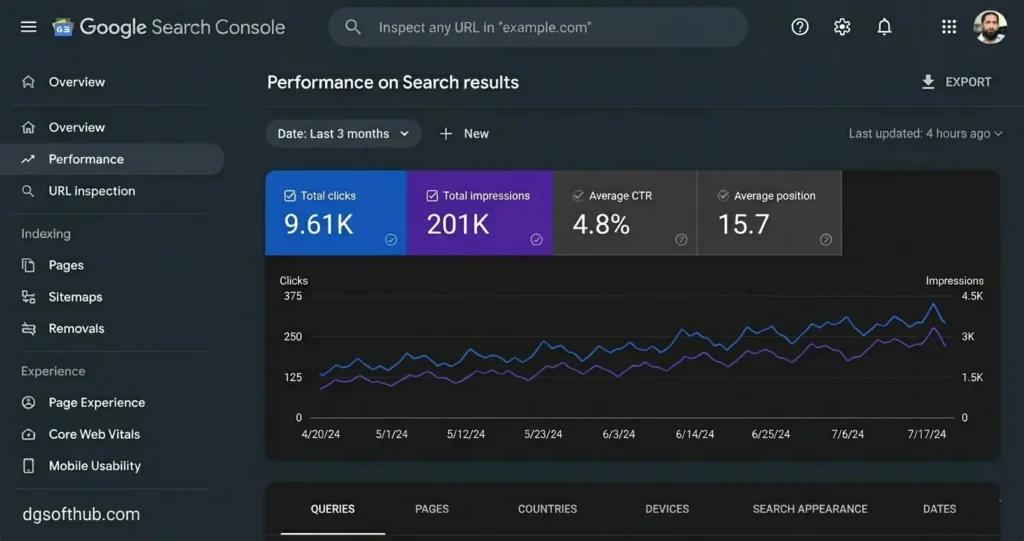
If you only install one tool from this list, make it this one. Search Console is free, it’s built by Google, and it shows you exactly how your site behaves in search results — which pages get clicks, which keywords bring people in, and which pages Google hasn’t indexed yet.
What it’s good for:
- Seeing real search queries that bring traffic to your site
- Spotting indexing errors before they tank your rankings
- Submitting new pages so Google finds them faster
In real situations, I’ve seen beginners publish a post and assume Google will find it automatically. Sometimes it takes weeks. Search Console lets you nudge that along instead of just waiting.
When I launched Dgsoft Hub, I initially ignored Search Console. Three weeks later I discovered Google hadn’t indexed several posts. After manually submitting them, indexing happened much faster.
2. Google Analytics
Search Console tells you how people find you. Analytics tells you what they do once they arrive. That distinction matters more than most beginners realize.
What it’s good for:
- Seeing where your visitors are coming from (search, social, direct links)
- Spotting which pages people leave quickly — a sign something needs fixing
- Understanding your audience well enough to write content they’ll actually stick around for
A common mistake here is checking the numbers once and never again. Analytics is only useful if you revisit it regularly and actually act on what you see.
3. Ubersuggest
This one’s a solid pick for beginners specifically because it doesn’t overwhelm you with data you don’t know how to use yet. You type in a topic, and it gives you keyword ideas, search volume, and a rough sense of how competitive each one is.
What it’s good for:
- Finding keyword ideas you wouldn’t have thought of on your own
- Getting a basic SEO audit of your site
- Generating content ideas when you’re stuck on what to write next
4. Answer The Public
Instead of giving you keywords, this tool gives you questions — the actual phrases people type into Google. That’s gold for beginners because question-based content tends to match what people are genuinely curious about, not just what ranks well.
What it’s good for:
- Finding blog topic ideas based on real questions
- Understanding search intent (what someone actually wants when they type a query)
If you’ve ever stared at a blank screen wondering what to write about next, this tool solves that problem fast.
5. Yoast SEO or All in One SEO (for WordPress users)
If your site runs on WordPress, one of these two plugins is basically non-negotiable. They sit right inside your editor and tell you, in plain language, what’s missing from your post — things like a meta description, proper heading structure, or a keyword that’s missing from your title.
What it’s good for:
- Catching basic on-page SEO mistakes before you hit publish
- Checking readability so your content isn’t too dense
- Managing meta titles and descriptions without touching code
I’d lean toward All in One SEO if you want something a little more beginner-friendly out of the box, but honestly either one will cover what you need at this stage. As far as my experience, I am using All in One SEO for the time being I am satisfied with it.
6. Google Keyword Planner
This tool was technically built for advertisers, but it’s still genuinely useful for organic SEO. It shows you search volume and keyword suggestions straight from Google’s own data — which is more reliable than most third-party estimates.
What it’s good for:
- Getting accurate search volume numbers
- Finding related keyword variations
- Gauging how competitive a keyword is before you commit a whole article to it
7. PageSpeed Insights
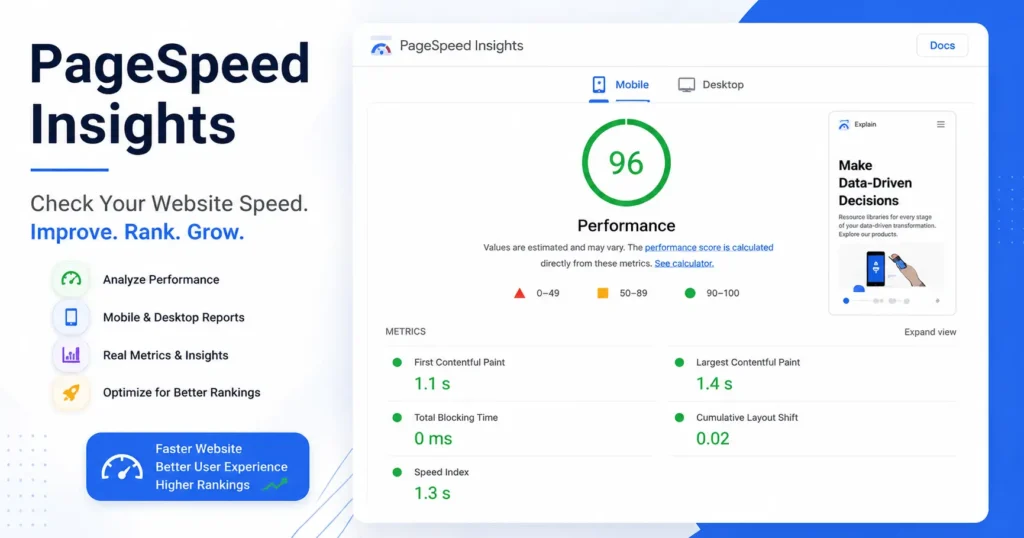
Here’s something a lot of beginners overlook: speed is a ranking factor, and a slow site can quietly undo all your other SEO work. PageSpeed Insights tests your site and tells you exactly what’s slowing it down. After compressing my featured images and converting them to WebP, my PageSpeed score improved noticeably.
What it’s good for:
- Running a free speed test on any page
- Getting a prioritized list of fixes, not just a vague score
- Comparing mobile vs desktop performance, since most traffic is mobile now
You don’t need to be a developer to fix most of what it flags. A lot of the time it’s something simple, like compressing images or removing a plugin you forgot you installed.
How to Choose the Best SEO Tool When You’re Starting Out
You don’t need all seven tools running at once — that’s actually part of the problem for a lot of beginners. Too many dashboards, too much data, not enough action.
If you’re just getting started, I’d suggest this order:
- Google Search Console — set this up on day one, no exceptions
- An SEO plugin (Yoast or All in One SEO) — so every post you publish is at least optimized at a basic level
- Ubersuggest — once you’re ready to plan content instead of just publishing randomly
Get comfortable with these three before adding anything else. You can layer in Analytics, Answer the Public, and the rest once you have a rhythm going.
Free vs Paid SEO Tools: What Actually Matters
Paid tools do offer more — deeper competitor data, more keyword history, fancier dashboards. But here’s the honest truth: most beginners aren’t even using 20% of what the free tools offer yet, so paying for more data just adds noise.
| Free Tools | Paid Tools | |
| Good for | Beginners, small sites | Agencies, larger sites with budget |
| Data depth | Limited but enough to act on | Deeper, more historical |
| Learning curve | Easier to start with | Often more complex |
Start free. Once you’ve outgrown what a free tool can tell you — and you’ll know, because you’ll start asking questions it can’t answer — that’s the signal to consider upgrading, not before.
For Dgsoft Hub, I currently use Google Search Console, Google Analytics, AIOSEO, and PageSpeed Insights. These four tools cover most of my SEO needs without requiring a paid subscription.
Common Mistakes Beginners Make With SEO Tools
A few patterns I see over and over:
- Installing five tools and using none of them properly. One tool used consistently beats five tools opened once and forgotten.
- Collecting data but never acting on it. Checking Search Console weekly only helps if you actually fix what it flags.
- Chasing keywords with huge search volume and ignoring competition. A keyword with 10,000 searches a month is useless if you’re competing against sites with years of authority.
- Treating tools as a substitute for good writing. No plugin will save a post that doesn’t actually answer the reader’s question.
Other related useful topics
- How to Make Money with Digital Marketing (Beginner Guide)
- Best Digital Marketing Skills to Learn in 2026 (Beginner Guide)
- A Practical Guide for Business Owner and Marketers
- Rank Your Blog on Google Faster in 2026 (On-Page SEO Checklist for Beginners)
FAQs
Q: Which SEO tool is best for beginners?
Google Search Console, hands down. It’s free, it’s accurate since the data comes straight from Google, and it teaches you how search actually works for your specific site.
Q: Are free SEO tools enough, or do I need to pay eventually?
For most beginners and small sites, free tools are genuinely enough for the first year or longer. Paid tools start making sense once you’re managing multiple sites or competing in a tougher niche.
Q: How long before I see results from using these tools?
Be realistic — SEO usually takes a few months to show meaningful movement, even when you’re doing everything right. The tools speed up your learning curve, not Google’s indexing timeline.
Q: Do I need to use all seven tools at once?
No. Start with two or three, get comfortable, then expand. Tool overload is one of the most common reasons beginners give up on SEO early.
The Real Takeaway
Tools won’t rank your site for you — but they will stop you from working blind. Set up Search Console today, install an SEO plugin if you’re on WordPress, and check your data at least once a week. That alone puts you ahead of most beginners who publish and pray. Everything else on this list can wait until those habits stick.
About Author
Muhammad Arif Hussain is the founder of DGSoftHub, a dedicated digital marketing and SEO platform. Passionate about empowering beginners, he cuts through the fluff to deliver actionable, step-by-step guides that help creators, freelancers, and entrepreneurs grow their online traffic and launch successful digital careers from home.

[…] Best SEO Tools for Beginners in 2026 […]
[…] Best SEO Tools for Beginners in 2026 […]