
Updated: August-2026
You can write an excellent blog post, hit Publish, and still watch it disappear beyond the first few pages of Google. That usually isn’t because your writing is poor. More often, it’s because the SEO basics that help search engines understand and evaluate your content are missing. Without those fundamentals in place, Google has fewer signals to determine what your page is about, how useful it is, and whether it deserves to rank ahead of competing content.
That’s where SEO comes in. Search Engine Optimization isn’t about manipulating Google or chasing shortcuts. At its core, SEO is the process of making your content easier for both search engines and real people to understand.
If you’ve ever felt overwhelmed by technical jargon, conflicting advice, or claims that ‘SEO is dead,’ this guide is for you. We’ll focus on the fundamentals that continue to matter in 2026 and explain them in plain language so you can build lasting search traffic.
What’s Covered in This Guide
- Why SEO Basics Still Matter More Than Any Trick
- How Google Actually Decides Rankings
- The Ranking Factors That Actually Move the Needle
- Keyword Research Without Overcomplicating It
- Understanding Search Intent (The Part Beginners Skip)
- Choosing Keywords You Can Actually Rank For
- On-Page SEO Basics You Actually Need
- Title Tags, Meta Descriptions, and Headers
- Technical SEO Beginners Actually Need to Know
- Off-Page SEO and Backlinks — What Actually Works for New Sites
- Common SEO Mistakes That Quietly Kill Rankings
- How Long SEO Actually Takes
- What You Should Do Next
- Frequently Asked Questions
- Keep Learning
Why SEO Basics Still Matter More Than Any Trick
Artificial intelligence has changed how content is created, but it hasn’t removed the need for high-quality information. Millions of pages are published every day. Google’s challenge is deciding which pages genuinely deserve attention. That’s why modern SEO focuses less on tricks and more on relevance, experience, trust, and usefulness.
As I’ve built DGSoftHub, one pattern has become clear: articles with a clear structure, focused search intent, helpful examples, and strong internal links consistently perform better than pages written without a plan. Good writing matters, but helping both readers and search engines understand your content matters just as much.
SEO is also one of the few marketing channels that compounds over time. A well-optimized article can continue attracting visitors for months or even years after publication. Unlike paid advertising, every click doesn’t require another payment.
How Google Actually Decides Rankings
Understanding Google’s basic workflow makes every SEO recommendation easier to understand.
Step 1: Crawling. Google uses automated programs called crawlers to discover pages by following links across the web.
Step 2: Indexing. After finding a page, Google analyzes its content and decides whether it should be stored in its index.
Step 3: Ranking. When someone performs a search, Google compares indexed pages and chooses those most likely to satisfy the searcher’s intent. It considers hundreds of signals, including relevance, page experience, authority, freshness, and helpfulness.
Many beginners assume publishing automatically leads to rankings. In reality, your page must first be discovered, then indexed, and finally prove it deserves a position for a specific query.
The Ranking Factors That Actually Move the Needle
- Relevant, comprehensive content that answers the searcher’s question.
- Clear page structure using descriptive headings.
- Fast loading speed and mobile-friendly design.
- Helpful internal links connecting related topics.
- Trust signals, including accurate information and genuine experience.
- Backlinks from reputable websites over time.
Notice that keyword stuffing isn’t on this list. Modern SEO rewards pages that solve problems thoroughly instead of repeating the same phrase over and over.
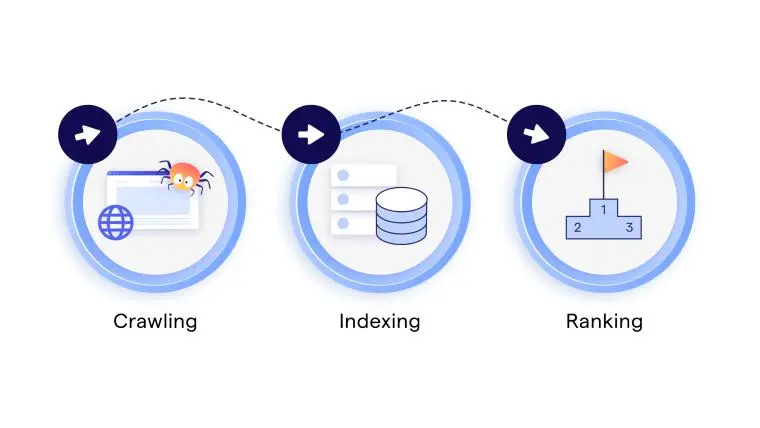
Google search process showing crawling, indexing, and ranking for SEO beginners
Understanding Search Intent (The Part Beginners Skip)
One of the biggest reasons new blog posts fail isn’t poor writing—it’s mismatched search intent. Search intent is simply the reason behind a search. Before you write a single word, ask yourself what the searcher expects to find.
Google has already studied millions of searches and knows what users generally want. If your content matches those expectations, your chances of ranking improve. If it doesn’t, even an excellent article may struggle.
There are four primary types of search intent:
- Informational: The user wants to learn something (for example, “what is SEO”).
- Commercial Investigation: The user is comparing products or services (“best SEO tools”).
- Transactional: The user is ready to take action (“buy SEO course”).
- Navigational: The user wants a specific website (“Google Search Console login”).
One habit that has consistently helped while building DGSoftHub is checking Google’s first page before writing. The top ten results tell you far more than any keyword tool. They reveal the preferred content format, the depth readers expect, and the questions Google believes deserve answers.
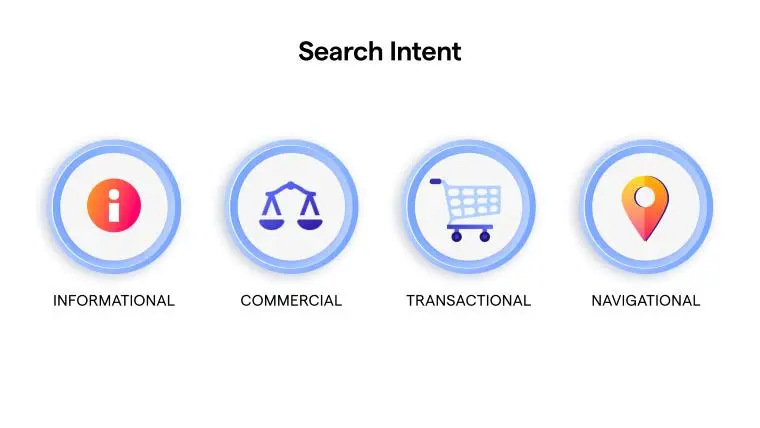
showing informational, commercial, transactional, and navigational search intent types.
Keyword Research Without Overcomplicating It
Many beginners think keyword research is about finding the biggest search volume. In reality, the best keyword is often the one you can realistically rank for.
Imagine choosing between two topics:
SEO (extremely competitive)
SEO basics for beginners (more specific)
The second keyword attracts fewer searches, but it gives a new website a much better chance of appearing on the first page.
Instead of asking ‘How many people search this?’, ask:
- Can I produce the best answer?
- Are the current results beatable?
- Does this topic match my audience?
- Can I naturally link this article to other content on my site?
This mindset shifts keyword research from chasing numbers to solving problems.
Start with Google’s autocomplete suggestions, the ‘People Also Ask’ section, and related searches at the bottom of the results page. These ideas come directly from real searches and often reveal valuable long-tail opportunities.
Free tools such as Google Keyword Planner and Ubersuggest can help estimate search demand, but treat the numbers as guidance rather than absolute truth.
If you’re unsure how to find keywords that new websites can realistically rank for, read How to Find Low Competition Keywords (Easy Method for Beginners).
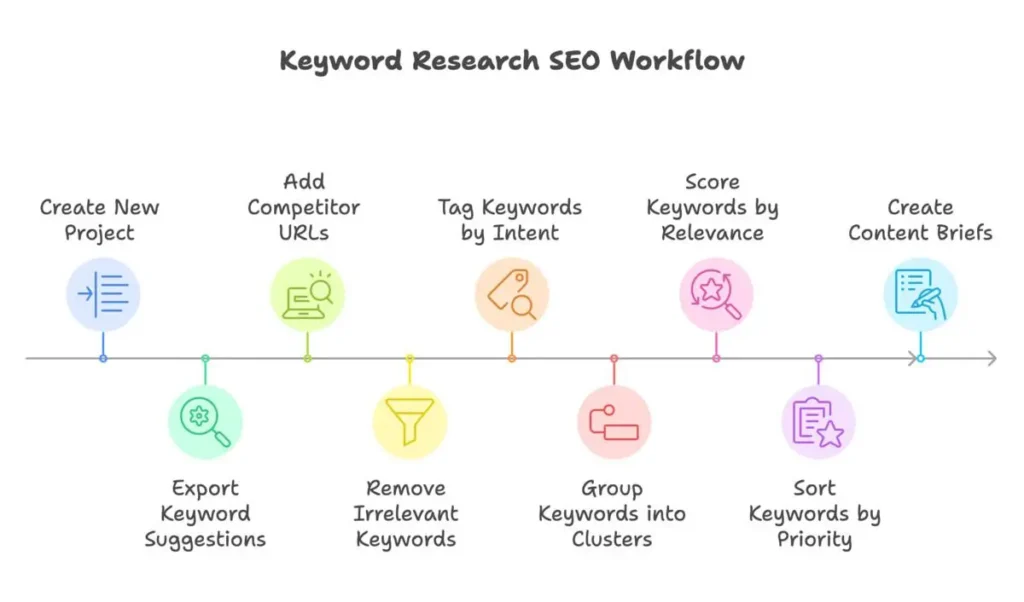
Keyword research workflow showing idea generation, keyword research, search analysis, and publishing.
Choosing Keywords You Can Actually Rank For
One mistake I see beginners make repeatedly is targeting broad keywords far too early. Competing with websites that have published thousands of articles rarely ends well.
A better strategy is to build authority gradually through related, low-competition topics.
For example:
Instead of writing one article targeting ‘SEO,’ publish several focused guides:
- SEO Basics for Beginners
- How to Find Low Competition Keywords
- On-Page SEO Checklist
- Google Search Console Guide
- Internal Linking Best Practices
Together, these articles strengthen your topical authority while creating natural opportunities for internal linking.
Think of every article as one brick. One brick doesn’t build a house, but hundreds of carefully placed bricks eventually create a strong foundation.
That is exactly how successful SEO grows—one useful article at a time.
On-Page SEO Basics You Actually Need
You’ve researched your keyword and understand what your audience is looking for. Now comes the part that determines whether Google can easily understand your page.
Here’s where many beginners go wrong. They spend hours writing a helpful article, hit Publish, and assume the job is finished. In reality, publishing is only part of the process. On-page SEO gives your content the structure it needs to compete.
Think of it this way: writing a great article is like building a beautiful house. On-page SEO is adding the street address, signs, and directions so visitors—and Google—can find it easily.
On-page SEO isn’t about tricking search engines. It’s about making your content clearer, easier to read, and easier to understand.
Start with a Strong Title
Your title is usually the first thing people see in Google. Include your primary keyword naturally, keep it compelling, and avoid clickbait. A title should promise a benefit while accurately describing the page.
Title Tags, Meta Descriptions, and Headers
Although meta descriptions aren’t a direct ranking factor, they influence click-through rate. Write a concise summary explaining what readers will learn and why your page is worth visiting.
Create Simple, Descriptive URLs
Avoid long URLs filled with unnecessary words or dates. Short, readable URLs help both users and search engines understand the topic.
Use Headings to Guide Readers
One H1, logical H2s, and H3s where needed make articles easier to scan. Most visitors don’t read every word—they scan first and decide whether your content deserves their time.
Optimize Images
Every image should support the content, use descriptive filenames, meaningful alt text, and be compressed for faster loading. Large images slow websites and hurt user experience.
Build Internal Links Naturally
Internal links connect related articles and help readers continue learning. They also help search engines understand how your content fits together. As DGSoftHub grows, every new article should strengthen older articles through relevant internal links.
Ready to Put Your SEO Knowledge Into Practice?
Learning how SEO works is the first step. Ranking a website requires a consistent process for researching, optimizing, measuring, and improving your content.
Digital Marketing for Beginners — Complete 2026 Roadmap gives you the broader digital marketing foundation, while the included SEO resources help you turn the SEO concepts you’ve learned into a practical workflow.
Your purchase includes:
- 📘Digital Marketing for Beginners — Complete 2026 Roadmap
A practical beginner-friendly guide with exercises, worksheets, and a 90-day action plan. - 🧰SEO Success Toolkit — 2026
An 8-module implementation workbook for turning SEO knowledge into a repeatable workflow. - 🔎Google Search Console Action Checklist — 2026 Edition
A practical checklist for monitoring and improving your site’s search performance.
One purchase. Three practical resources.
$19 — Instant digital access
Learn. Implement. Grow Online.
Link to Trustworthy Sources
External links show readers where information comes from. Use reputable sources when supporting facts or statistics rather than linking simply for the sake of adding outbound links.
Add Schema Where Appropriate
Schema helps search engines understand your content more clearly. FAQ schema, Article schema, and Breadcrumb schema are excellent starting points for beginner websites.
A Simple On-Page SEO Workflow
Before publishing any article, ask yourself:
- Does my title clearly explain the topic?
- Does my introduction answer the searcher’s question?
- Have I used headings to organize the content?
- Are my images optimized?
- Have I added internal links to related articles?
- Is my page easy to read on mobile devices?
This checklist only takes a few minutes, but following it consistently can make every article stronger.
One lesson I’ve learned while building DGSoftHub is that consistency almost always beats perfection. A website with twenty well-optimized, genuinely helpful articles usually performs better over time than one with a handful of excellent articles and no clear structure. Every page should make the next page stronger through thoughtful internal linking and consistent optimization.
That’s why on-page SEO isn’t a task you complete once—it’s a publishing habit that becomes part of your workflow.
For a complete optimization checklist, see Rank Your Blog on Google Faster (On-Page SEO Checklist for Beginners).
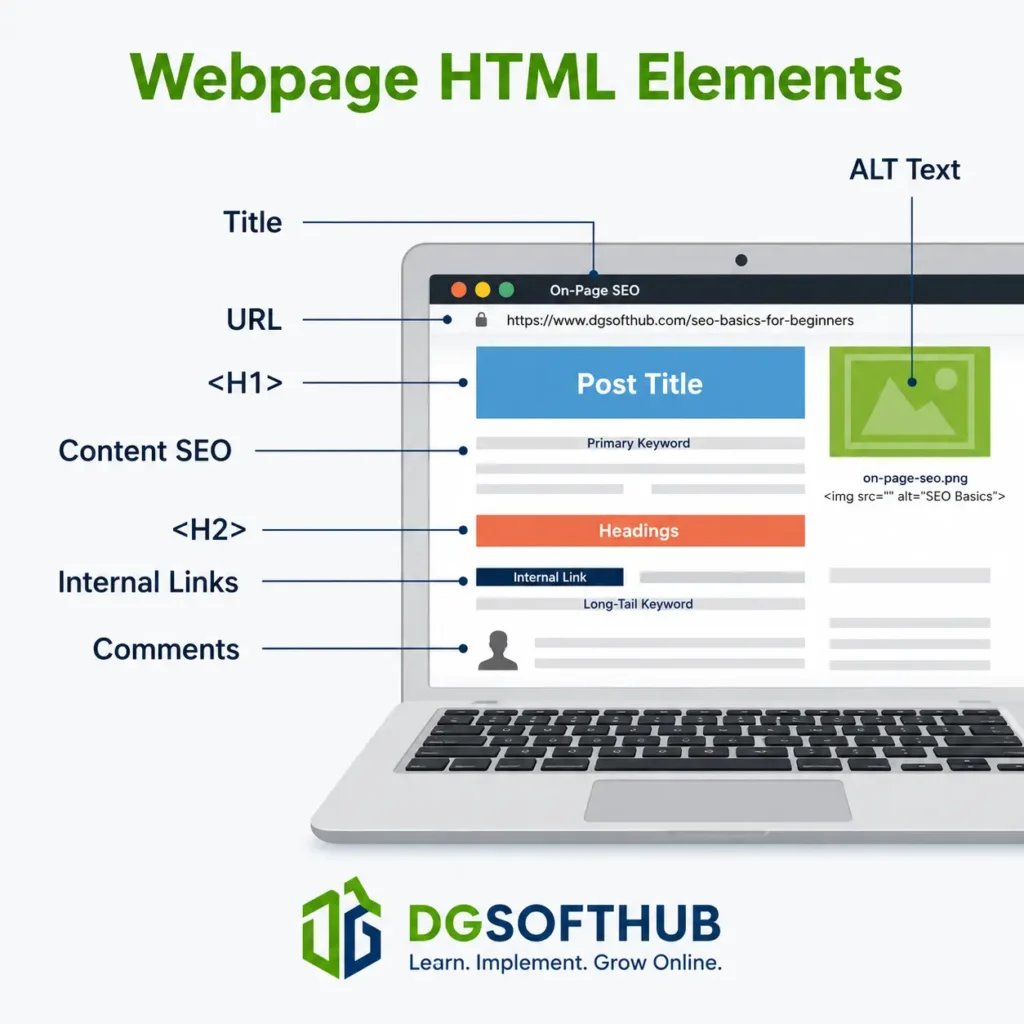
On-page SEO showing title tags, meta description, headings, images, internal links, and schema markup.
Technical SEO Beginners Actually Need to Know
The phrase technical SEO scares a lot of beginners. It sounds like something only developers need to worry about.
The good news? Most new bloggers don’t need to become technical SEO experts.
In fact, you can ignore dozens of advanced technical topics and still build a website that Google can crawl, understand, and rank.
Think of technical SEO like the foundation of a house. Visitors rarely notice it, but if it’s weak, everything built on top becomes less stable.
Focus on getting these fundamentals right first.
Make Sure Your Website Uses HTTPS
Have you ever noticed the little padlock icon beside a website’s address?
That means the website is using HTTPS, which encrypts data between your visitors and your server.
Besides improving security, HTTPS has been a confirmed Google ranking signal for years.
Fortunately, most hosting companies now provide free SSL certificates, so enabling HTTPS usually takes just a few clicks.
Once enabled, make sure every page redirects from HTTP to HTTPS so Google only indexes one version of your website.
Once your pages are optimized, the next challenge is creating content that deserves to rank. Our guide on How to Write SEO-Friendly Blog Posts walks through that process step by step.
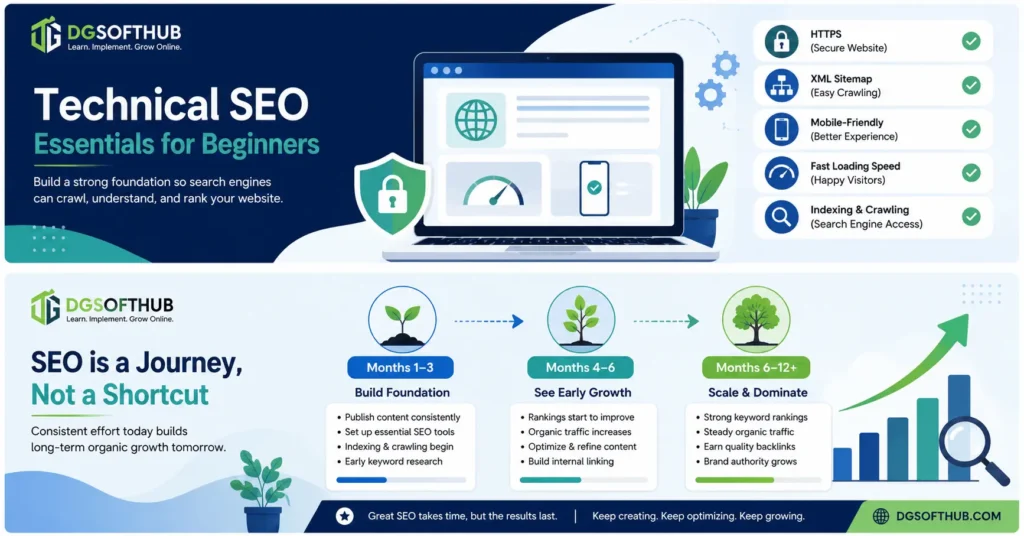
Quick SEO Basics Checklist
Before moving on, take a moment to make sure you’ve covered the SEO fundamentals discussed so far. You don’t need everything to be perfect, but checking these basics can give your content a much stronger foundation.
- ✓ Understand the search intent behind your target keyword before you start writing.
- ✓ Choose one primary focus keyword and use it naturally throughout your content.
- ✓ Write a clear, compelling title and meta description that encourage clicks.
- ✓ Organize your content with one H1 and descriptive H2 and H3 headings.
- ✓ Add relevant internal links to help readers and search engines navigate your site.
- ✓ Make sure your website loads quickly and works well on mobile devices.
- ✓ Compress images and use descriptive alt text for better performance and accessibility.
- ✓ Install an SEO plugin and submit your XML sitemap through Google Search Console.
If you’ve checked off most of these items, you’re already ahead of many beginner websites. The next step is building your site’s authority beyond your own pages through backlinks and other off-page SEO signals.
Speed Matters More Than You Think
Nobody enjoys waiting for a slow website.
Neither do search engines.
If your page takes several seconds to load, visitors often leave before reading a single sentence.
That sends poor user experience signals to Google.
The good news is that beginners don’t need expensive optimization services.
Usually these simple improvements are enough:
- Compress images before uploading.
- Use modern image formats like WebP.
- Install a caching plugin.
- Choose reliable hosting.
- Remove plugins you don’t actually use.
Don’t obsess over getting a perfect PageSpeed score.
A fast, usable website is far more important than chasing 100/100.
Build for Mobile First
More than half of all searches now happen on mobile devices.
Google knows this.
That’s why it primarily evaluates the mobile version of your website when determining rankings.
Before publishing any article, open it on your phone and ask yourself:
- Is the text easy to read?
- Are buttons easy to tap?
- Do images scale properly?
- Is there too much empty space?
- Does the page load quickly?
If reading your own article feels frustrating on a phone, your visitors probably feel the same.
Submit Your Sitemap to Google Search Console
Publishing an article doesn’t automatically mean Google will discover it immediately.
One of the easiest ways to help Google find new pages is by submitting your XML sitemap through Google Search Console.
Think of your sitemap as a roadmap of your website.
Instead of making Google guess where everything is, you’re showing it every important page you’ve created.
If you’re using AIOSEO or Yoast SEO, your sitemap is usually generated automatically.
Submitting it only takes a few minutes, but it helps Google crawl your site more efficiently.
If you’re building your first website, my How to Start a Blog and Make Money in 2026 guide walks through setting up WordPress, Search Console, and the essential plugins.
Understand Crawling vs Indexing
These two terms confuse almost every beginner.
They’re related, but they’re not the same thing.
Crawling: Google discovers your page.
Indexing: Google decides whether your page deserves to be stored in its search index.
A page can be crawled without being indexed.
If Google thinks your content is too thin, duplicated, or low quality, it may choose not to index it.
That’s why simply publishing more articles isn’t enough.
Every article should provide genuine value.
Robots.txt: Don’t Overthink It
You’ll probably hear people talking about robots.txt.
For beginners, there’s very little you need to do.
Its main purpose is telling search engine crawlers which areas of your website should or shouldn’t be accessed.
Unless you’re intentionally blocking parts of your site, your SEO plugin usually creates a perfectly adequate robots.txt file automatically.
Don’t spend hours editing it.
Your time is better spent creating better content.
Canonical URLs
Sometimes the same page can exist under multiple URLs.
Google doesn’t like duplicate content because it creates confusion about which version should rank.
A canonical URL simply tells Google:
“This is the primary version of this page.”
Thankfully, WordPress SEO plugins usually handle canonical tags automatically.
Another reason beginners don’t need to worry about writing code.
Technical SEO Checklist
Before moving on, make sure your website checks these boxes:
- ✓ HTTPS enabled
- ✓ Mobile-friendly
- ✓ Fast loading
- ✓ XML sitemap submitted
- ✓ Google Search Console connected
- ✓ Images compressed
- ✓ SEO plugin installed
- ✓ Canonical URLs enabled
- ✓ No important pages accidentally blocked
Notice something?
None of these require advanced programming knowledge.
Technical SEO becomes much less intimidating once you focus on the essentials.
Off-Page SEO and Backlinks — What Actually Works for New Sites
If on-page SEO tells Google what your content is about, off-page SEO helps Google decide whether other people trust it.
The biggest part of off-page SEO is backlinks.
A backlink is simply another website linking to yours.
Imagine you’re looking for a new restaurant.
If one friend recommends it, that’s helpful.
If twenty respected friends recommend it independently, you’re much more likely to believe it’s worth visiting.
Google thinks similarly.
Each quality backlink acts like a vote of confidence.
But here’s the important part:
Not every vote carries the same weight.
Quality Beats Quantity Every Time
Years ago, people tried to manipulate Google by buying hundreds of backlinks.
That strategy no longer works.
In many cases, it hurts rankings.
One backlink from a respected, relevant website is often worth more than fifty links from low-quality directories.
Focus on earning links naturally by publishing content people genuinely want to reference.
How Beginners Can Earn Their First Backlinks
You don’t need thousands of visitors before earning backlinks.
Some realistic starting strategies include:
- Writing guest posts for relevant blogs.
- Creating genuinely useful resources.
- Publishing original research.
- Designing free templates or checklists.
- Building relationships with other creators in your niche.
Notice what these methods have in common.
They provide value first.
That’s exactly the type of link-building Google encourages.
Don’t Chase Shortcuts
If someone promises hundreds of backlinks overnight for a small fee, walk away.
Shortcuts often become long-term problems.
Building authority takes time.
The websites that consistently rank year after year rarely got there because of clever tricks.
They earned trust gradually through consistent publishing and genuinely useful content.
E-E-A-T: Why Your Experience Matters More Than Ever
One of the biggest changes in modern SEO is Google’s growing emphasis on Experience, Expertise, Authoritativeness, and Trustworthiness, often shortened to E-E-A-T.
This doesn’t mean every article needs a PhD behind it.
It means Google wants evidence that the content comes from someone who actually understands the topic.
That’s one reason I encourage including:
- Original screenshots.
- Personal observations.
- Real examples.
- Lessons learned.
- Honest limitations.
On DGSoftHub, I’ve noticed that articles become far more engaging when they move beyond definitions and explain what actually happened while applying those ideas.
Readers remember experiences.
Search engines increasingly reward them too.
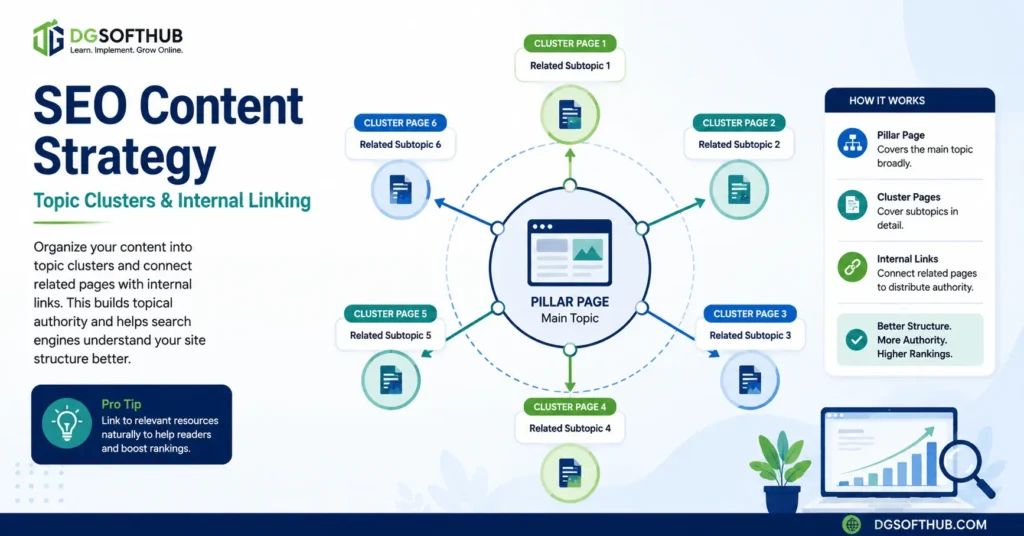
Building topic clusters with strong internal links helps search engines understand your website’s structure while guiding readers to related content.
Common SEO Mistakes That Quietly Kill Rankings
Most websites don’t fail because the owner never learned SEO.
They fail because they learn half of it.
A surprising number of beginner blogs have decent content but never reach page one because of a handful of mistakes that quietly limit their growth.
The good news is that almost all of these are fixable.
- Chasing Keywords Instead of Solving Problems
One of the biggest misconceptions about SEO is believing you’re writing for Google.
You’re not.
You’re writing for the person who typed something into Google.
That sounds like a small distinction, but it changes everything.
Imagine someone searches:
“How to start a blog.”
Are they looking for:
- the history of blogging?
- definitions?
- technical explanations?
Probably not.
They want someone to walk them through the process.
Google understands that.
That’s why pages that genuinely answer the searcher’s question usually outperform pages that simply repeat the keyword dozens of times.
Instead of asking,
“How many times should I use this keyword?”
ask,
“If I searched this myself, would this article completely answer my question?”
That mindset produces better content—and better rankings.
- Ignoring Search Intent
You can write an incredible article and still never rank.
Why?
Because it isn’t the kind of page people are looking for.
Search intent is Google’s way of understanding what the searcher actually wants.
For example:
If someone searches
“best free SEO tools”
Google is likely to show:
- comparison articles
- lists
- reviews
—not a detailed tutorial on how search engines work.
Likewise,
someone searching
“what is technical SEO”
expects an explanation, not a product review.
Before writing anything, spend five minutes looking at page one.
Notice:
- article format
- length
- headings
- media
- questions answered
Google has already shown you what users expect.
Your goal isn’t to copy those pages.
It’s to produce the most useful version of that format.
This is also why keyword research matters more than many beginners realize. Choosing the right keyword before writing saves far more time than trying to optimize the wrong article later.
- Publishing Thin Content
Years ago, a 500-word article could rank.
Today, competition is different.
That doesn’t mean every article needs to be 4,000 words.
It means readers expect complete answers.
If your guide leaves people searching for another article immediately afterward, Google notices.
A good article answers:
- the main question
- common follow-up questions
- practical examples
- beginner mistakes
- next steps
The objective isn’t writing more.
It’s leaving fewer unanswered questions.
Forgetting Internal Links
Internal linking is one of the easiest SEO improvements you’ll ever make.
Yet it’s often ignored.
Every time you publish something new, ask yourself:
Which older article naturally relates to this?
Then link them together.
For example:
If someone reads your guide about starting a blog, they may naturally want to learn:
- SEO basics
- keyword research
- writing blog posts
- AI tools
- digital marketing
Helping readers continue learning creates a better experience.
It also helps Google understand the relationship between your pages.
Over time, your website starts feeling like a connected resource instead of dozens of unrelated articles.
- Never Updating Older Content
Publishing isn’t the finish line.
It’s the beginning.
Search results change.
Competitors improve.
Google updates.
Your own experience grows.
That’s why the strongest websites revisit older content regularly.
Sometimes all an article needs is:
- fresher screenshots
- better examples
- updated statistics
- clearer explanations
- improved headings
- additional FAQs
Small improvements often produce surprisingly large ranking gains.
How Long SEO Actually Takes
This is probably the question every beginner asks.
Unfortunately, it’s also the one with no exact answer.
SEO isn’t a switch you turn on.
It’s a process.
Here’s a realistic expectation.
Months 1–3
You’re building your website.
Google is discovering pages.
Some posts may not rank at all.
Others might appear on page five or beyond.
That’s completely normal.
Months 4–6
This is where things usually become more interesting.
Some low-competition keywords begin climbing.
Older posts start attracting consistent impressions.
You begin learning which topics resonate with readers.
Traffic may still be modest, but momentum starts building.
Months 6–12
If you’ve continued publishing helpful content consistently, this is often when the first significant growth appears.
Your website has more authority.
Google trusts your content more.
Internal links become stronger.
Older articles continue attracting visitors while newer ones gain traction.
Instead of relying on one successful post, your site begins generating traffic from multiple pages.
That’s when SEO becomes powerful.
Because every new article strengthens the ones you’ve already written.
Do You Want a Faster Start?
If you want templates, tools, and a roadmap:
👉 Download the Digital Marketing Starter Kit and grow faster
Frequently Asked Questions
What are SEO basics?
SEO basics are the foundational practices that help search engines understand and rank your content. They include keyword research, understanding search intent, writing helpful content, optimizing titles and headings, improving page speed, using internal links, and ensuring your website is easy to navigate.
How long does SEO take to work?
Most new websites begin seeing early movement within three to six months, although competitive topics often take longer. SEO is a long-term strategy, and consistent publishing typically produces better results than chasing quick wins.
Can I learn SEO without paying for expensive tools?
Yes.
Many beginners can learn and improve using free resources like Google Search Console, Google Keyword Planner, and Google Trends. Paid tools become more useful as your website grows, but they aren’t essential when you’re starting.
Is keyword density still important?
Not in the way it once was.
Modern search engines understand topics much better than simple keyword repetition. Focus on writing naturally and covering the subject thoroughly rather than trying to reach a specific keyword percentage.
Can I rank without backlinks?
Yes—for many low-competition keywords.
High-quality content that satisfies search intent, combined with good on-page SEO, can rank without many backlinks. However, as competition increases, earning quality backlinks becomes increasingly important.
Does website speed affect SEO?
Yes.
A slow website can create a poor user experience, increasing bounce rates and reducing engagement. Improving loading speed benefits both visitors and search performance.
Should every page target one keyword?
Generally, yes.
Choose one primary focus keyword and naturally include related terms throughout the article. Trying to target many unrelated keywords in one page often weakens its overall focus.
How often should I update old blog posts?
Review important articles every few months.
Update outdated information, improve examples, answer new questions, and refresh screenshots where necessary. Maintaining existing content is often easier—and more effective—than constantly publishing new articles.
Does AI-generated content hurt SEO?
AI-generated content isn’t automatically penalized. What matters is whether the content is accurate, original, and genuinely helpful. AI can assist with research and drafting, but adding your own experience, examples, and insights makes the content more valuable for readers.
Digital Marketing & SEO Bundle
Everything you need to turn SEO concepts into a practical, repeatable workflow.
Includes 3 Resources:
- 📘2026 Digital Marketing Roadmap — Guide with a 90-day action plan & worksheets.
- 🧰2026 SEO Success Toolkit — 8-module implementation workbook.
- 🔎Google Search Console Checklist — Quick-action performance guide.
— Instant Digital Access
What You Should Do Next
If there’s one thing to remember, it’s this: SEO isn’t about finding shortcuts—it’s about consistently creating content that deserves to rank. The strongest websites aren’t built overnight. They’re built one helpful page at a time. Keep learning, keep improving, and each article you publish becomes another long-term asset for your website, you already know more SEO than many website owners ever learn.
The challenge now isn’t finding more information.
It’s applying what you’ve learned.
Here’s a practical roadmap.
- Choose one existing blog post and improve its title, headings, internal links, and search intent before writing anything new.
- Install and verify Google Search Console if you haven’t already.
- Research your next article before writing it by studying page one of Google.
- Build the habit of adding internal links every time you publish a new article.
- Set aside time every few months to update your strongest content instead of only creating new posts.
SEO rewards consistency far more than perfection.
Small improvements made every week often outperform occasional bursts of motivation.
Keep Learning
Continue building your SEO knowledge with these beginner-friendly guides:
- How to Start a Blog and Make Money in 2026
- How to Find Low-Competition Keywords (Easy Method for Beginners)
- Best SEO Tools for Beginners
- How to Write SEO-Friendly Blog Posts
About the Author
This guide was written by the founder of DGSoftHub, a digital marketing education platform dedicated to helping beginners build practical online skills. Through in-depth tutorials, real-world examples, and step-by-step guidance, DGSoftHub simplifies topics such as SEO, AI tools, blogging, content strategy, and digital marketing so readers can confidently apply what they learn.
Our mission is simple: Learn. Implement. Grow Online.
[…] SEO Basics for Beginners […]
[…] SEO Basics for Beginners […]
[…] SEO Basics for Beginners […]
[…] SEO Basics for beignners […]
[…] SEO Basics – Step-by-Step Guide to Rank on Google […]
[…] SEO Basics – Step-by-Step Guide to Rank on Google […]