
Best Free Tools for Digital Marketing Beginners (2026 Guide)
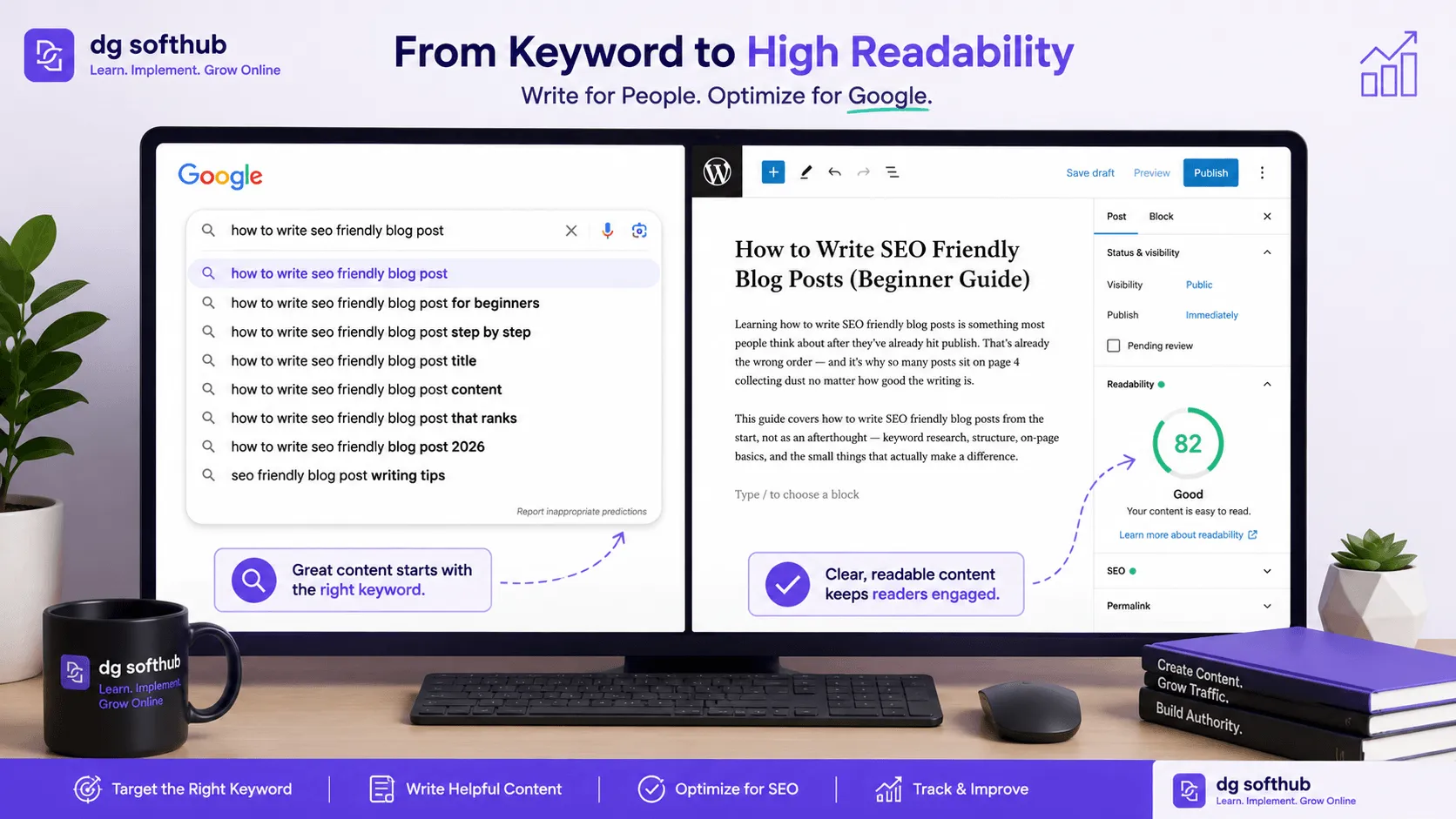
Learning how to write SEO friendly blog posts is something most people think about after they’ve already hit publish. That’s the wrong order—and it’s exactly why so many articles sit on page four of Google collecting dust. You can write the most brilliant prose on the internet, but if you don’t use the best free tools to align your words with actual search data, you are essentially invisible. Fortunately, you don’t need a massive budget—the right free SEO blog post tools can do the heavy lifting for you.
This step-by-step guide walks you through the exact process of identifying search intent, structuring your content, and optimizing your layout using entirely free digital marketing software.
Back when I started my first blog, I spent three straight days writing a massive 3,000-word piece on “Digital Marketing Strategy.” I polished every sentence, hit publish, and waited for the floodgates to open. Three months later, it had exactly four views—and two of them were from my friend. That’s when I learned the hard way: writing an article before finding a keyword is just hoping. This guide covers how to use free SEO blog post tools so you don’t repeat my early mistakes.
Start with Search Intent, Not a Random Topic
Here’s how most beginners approach a new post: they think of a topic that sounds interesting, write 1,200 words, and then try to sprinkle in keywords at the end. That isn’t optimization. That’s just wishing.
Most beginners skip this step entirely, which is why their traffic metrics flatline. The smarter approach is to find out exactly what people are already typing into search boxes, then build your outline around those exact pain points.
Free Keyword Research Without Paid Software
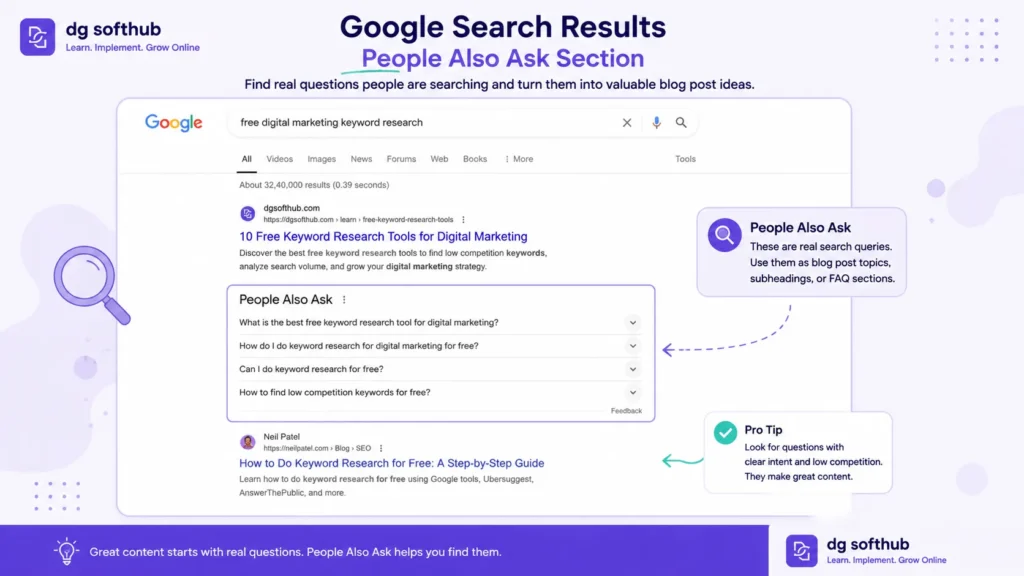
You do not need a three-figure monthly software subscription to find high-value search terms. The absolute best tool for finding raw human search data sits right on your browser homepage: Google Autocomplete.
- Google Autocomplete: Type a partial phrase related to your niche into Google, but don’t press enter. Look at the predictions underneath. Those are pulled from real searches happening right now.
- People Also Ask (PAA) Boxes: Search your main topic and scroll down slightly. The PAA section contains the exact questions your audience wants answered. Each question is a ready-made H2 or H3 heading for your draft.
- AnswerThePublic: This tool visualizes the “who, what, why, and how” questions around any seed keyword. The free version gives you plenty of data to plan a comprehensive article.
In practice, here is exactly what I do when looking at search metrics on free dashboards like Ubersuggest or Google Keyword Planner. If I see a keyword like “free SEO blog post tools” with a Search Volume of 250 and a SEO Difficulty (SD) score under 30, I target it immediately. Why? Because I’ve repeatedly proven on my own sites that clean, dedicated content can capture these low-competition long-tail phrases within 30 to 45 days, whereas chasing a massive phrase like “SEO tools” will keep you buried on page 6 forever.
What Makes a Safe Keyword for New Sites?
Here’s where things usually go wrong: beginners target massive, single-word phrases. If you try to rank a new blog for “digital marketing,” you will lose to multi-million dollar publishing empires every single time.
Instead, look for long-tail keywords. These are highly specific phrases, usually four or more words long. They have lower monthly search volume, but the competition is incredibly thin. A keyword that gets 150 searches a month with zero competition is infinitely better than a massive keyword you have no statistical chance of ranking for.
Structure Your Post for Skimmers and Spiders
Experienced content creators always outline before they type. If you write without a blueprint, your content will meander, repeat itself, and exhaust your reader’s attention span.
A tight structural layout does two things simultaneously: it keeps real humans reading longer, and it tells search engine crawlers exactly how your ideas connect.
The Ideal Heading Hierarchy
Think of your blog post like a book outline. You only get one H1 tag per post—that’s your main article title. From there, your structure should cascade logically down the page.
- H1: Main Title (must include your focus keyword naturally).
- H2 Sections: The main chapters of your post. If a reader only reads your H2s, they should still walk away with a clear summary of your core message.
- H3 Sub-sections: Use these to break down specific tactics under an H2 so readers aren’t confronted with a massive wall of text.
In practice, what this looks like is a neat, scannable ladder. If you have an H2 titled “Essential On-Page Optimization,” your H3s under it should be “Title Tags,” “URL Slugs,” and “Alt Text.” Never skip from an H1 straight to an H3.
Free Editing Tools for Readability
SEO and great writing are not separate tasks. In fact, Google rewards content that keeps people on the page. If a user clicks your link, sees a giant block of tiny text, and hits the back button within five seconds, Google notices that bounce. It signals that your page didn’t solve their problem.
To combat this, you need to write for scanning eyes. Keep your paragraphs to three or four lines maximum. Vary your sentence lengths. Use short punches to drive momentum, then expand into a longer sentence when you need to introduce real technical depth.
Hemmingway Editor (Free Web Version)
The Hemingway Editor is a phenomenal free tool for cleaning up muddy prose. It scores your text based on readability and highlights complex sentences that need breaking up.
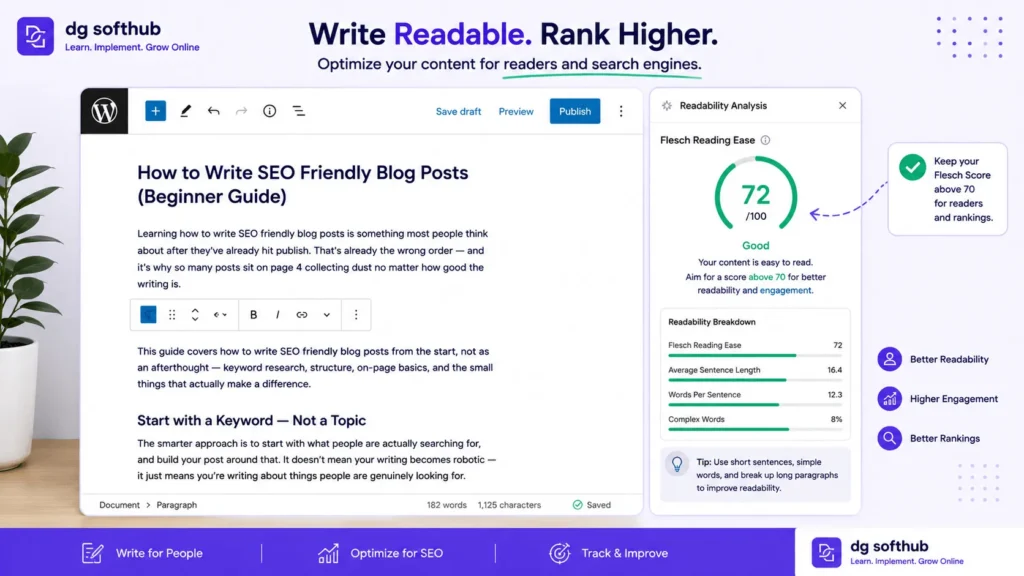
Target a Flesch Reading Ease score between 70 and 80. This ensures your text reads like a natural conversation rather than an academic essay. If your phrasing sounds too formal, read it out loud. If you wouldn’t say it that way over coffee, rewrite it.
The Hemingway Editor is my personal secret weapon. Last year, I audited an older, underperforming article on my site that was pulling impressions but zero conversions. The text was incredibly heavy, scoring a Flesch Reading Ease level of 48. I ran it through Hemingway, broke up the long paragraphs, brought the readability score up to 76, and updated the draft. Within three weeks, our average time-on-page jumped by 84%, and Google bumped the post up to the top half of page one.
Technical On-Page Checklist
Once your text is polished, you need to handle the mechanical details before hitting the publish button. This is the part nobody talks about enough: technical hygiene matters just as much as good vocabulary. I used to think that if my content was comprehensive, Google would figure out the rest. I was wrong. It wasn’t until I built a strict pre-publish routine around free optimization tools that my organic traffic finally started to move in the right direction.
Here is the exact technical workflow I test and run on every single post before it goes live.
URL Slugs and Meta Snippets
Keep your URL slug incredibly brief. Strip out filler words like “a,” “the,” and “and.” Your slug should be lowercase, separated by hyphens, and put your keyword first.
Your meta description needs to read like a human wrote it, not a robot trying to check off an optimization box. It acts as your organic ad copy on the search results page. Give the user a clear, compelling reason to click through to your site.
Image Optimization: The TinyPNG + WebP Framework
Unoptimized imagery is the silent killer of search rankings. Early on, I uploaded beautiful, uncompressed high-resolution screenshots straight to my media library. My page-load times plummeted, my mobile Core Web Vitals scores turned a terrifying shade of red, and my rankings dropped. Google explicitly factors page speed into its system, and real readers will bounce if a page takes more than three seconds to load.
Now, I use a strict two-step free workflow:
- Compress: Before an image ever touches WordPress, I drop it into TinyPNG. It uses smart lossy compression to reduce file sizes by 60% to 80% without any visible loss in quality.
- Convert: I convert all imagery into modern formatting like WebP, aiming to keep every asset under 100KB.
When you upload, you must fill out the Alt Text. Don’t leave it blank, and don’t write generic names like image1.png or stuff it with keywords. Write a literal, helpful description of what is happening in the graphic for visually impaired readers. For example, “Google Search Console dashboard performance report showing an upward trend in organic blog impressions” tells search engines exactly what the asset represents while naturally incorporating relevant context.
Header Mapping and the 100-Word Rule
Here’s a trick I discovered after reviewing dozens of my posts that were stuck on page two: Google crawls your page looking for immediate relevance. If you don’t establish what your page is about right away, you lose.
- The 100-Word Rule: I make sure my focus keyword,
[free SEO blog post tools], appears naturally within the first 100 words of my opening paragraph. This provides an immediate relevancy signal to search spiders. - The H2 Safeguard: I always ensure that my exact primary phrase is mapped into at least one prominent H2 subheader.
If you use a free plugin like Rank Math or AIOSEO, use their built-in snippet editors to preview your work. Don’t worry about forcing a perfect 100/100 plugin score—those checklists are just guides. Focus on keeping your slug clean, your files light, and your target terms sitting naturally inside your heading hierarchy. That is what moves the needle in the real world.
Want a Faster Start?
If you want ready templates, tools list, and roadmap:
👉 Download the Digital Marketing Starter Kit and grow your blog traffic faster:
Want to Go Deeper?
Rank Your Blog on Google Faster in 2026 (On-Page SEO Checklist for Beginners)
Free AI Tools Every Beginner Digital Marketer Should Use in 2026
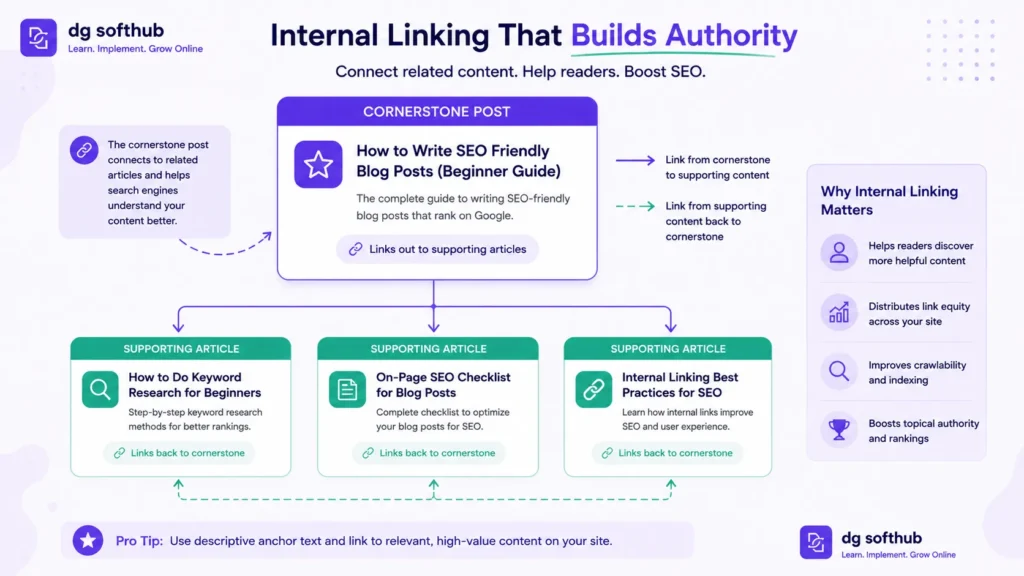
How to Write SEO Friendly Blog Posts (Beginner Guide)
FREQUENTLY ASKED QUESTIONS
Q: How long should an SEO friendly blog post be?
There is no universal word count rule. Your post needs to be long enough to fully answer the search user’s intent. For simple questions, 800 words might be plenty. For deep, comprehensive guides, you may need 2,000 words or more. Focus on depth and value rather than arbitrary numbers.
Q: Can I use free AI tools to write my blog posts?
You can absolutely use AI to brainstorm outlines, generate keyword ideas, or rephrase clunky paragraphs. However, completely unedited AI drafts often sound incredibly generic and lack personal experience. Use AI as a structural assistant, but ensure the final voice is undeniably yours.
Q: How many keywords should I target in one article?
Focus on one primary keyword phrase per post. You will naturally rank for dozens of long-tail variations and synonyms simply by writing a detailed, helpful article. Trying to force multiple unrelated keywords into one piece of content usually results in an unreadable mess.
Q: How long does it take for a new blog post to rank on Google?
For a brand-new website targeting low-competition keywords, it typically takes anywhere from four to twelve weeks to see meaningful organic movement. Search engine indexing is a slow, compounding process. Consistency and patience matter far more than overnight data spikes.
Q: Do I need to know how to code to optimize my blog?
Not at all. Free WordPress plugins like Rank Math or AIOSEO handle the technical coding requirements in the background. You simply type your titles, descriptions, and keywords into straightforward form fields, and the plugin formats everything correctly for search crawlers.
What You Should Do Next
- Pick One Long-Tail Keyword: Before you open a blank document, use Google Autocomplete to find a specific, four-word question within your niche that real people are searching for right now.
- Draft Your Headings First: Create your H1, H2, and H3 layout inside your text editor before writing a single sentence of body copy. Ensure every heading directly answers a user’s question.
- Run Your Copy Through Hemingway: Paste your completed draft into the free Hemingway app and rewrite any sentences flagged as overly complex until your readability score sits comfortably above 70.
- Compress Every Single Image: Use TinyPNG to shrink your file sizes below 100KB, and write descriptive, literal alt text for every graphic before you schedule the post.
ABOUT THE AUTHOR
Muhammad Arif Hussain
Muhammad Arif Hussain is the founder of DGSoftHub, a digital marketing education platform built for beginners who want practical results, not theory. He writes step-by-step guides on SEO, AI tools, content strategy, and online business growth—cutting through the noise to share what actually works. When he’s not publishing at dgsofthub.com, he’s testing new tools so his readers don’t have to.


[…] Best Free Tools for Digital Marketing Beginners […]
[…] Best Free Tools for Digital Marketing Beginners (2026 Guide) […]