

Technical SEO for beginners sounds like something only developers should touch. It isn’t.
You’ve written a solid blog post, picked a decent keyword, done everything the usual SEO checklists tell you to do — and your page is still struggling to get visibility.
Sometimes, the problem isn’t the content. It’s what happens behind the scenes.
Technical SEO helps make sure search engines can find, crawl, understand, and access your important pages. It also covers things that affect how visitors experience your site, such as page speed, mobile usability, HTTPS, and site structure.
Here’s what you’ll learn: how to make your website technically easier for Google and other crawlers to access, without needing to become a developer or write complicated code.
What Is Technical SEO for Beginners, Really?
Think of technical SEO as the plumbing behind your website. Nobody sees it directly, but if a pipe is blocked, everything upstream can suffer.
It covers areas such as crawling, indexing, page performance, mobile experience, security, URL structure, redirects, canonical URLs, and structured data.
Most beginners skip this part because it sounds like developer work. In practice, many basic technical SEO tasks are configuration checks rather than programming. You may be checking settings in WordPress, reviewing a small file, testing a URL, or fixing something your visitors would never notice.
This is different from on-page SEO, which focuses mainly on the content itself — keywords, headings, search intent, readability, and how well the page answers the user’s question. Technical SEO is about whether search engines can access and process that content properly in the first place.
When I first started checking technical SEO issues on my own site, I found the terminology more confusing than the actual fixes. Once I understood what Google was trying to discover, crawl, and index, the problems became much easier to diagnose.
Technical SEO in One Simple Picture
| Area | What you check |
|---|---|
| Crawling | robots.txt, crawl access, important resources |
| Indexing | noindex, canonical URLs, HTTP status codes |
| Performance | LCP, INP, and CLS |
| Mobile | layout, content, links, and usability |
| Security | HTTPS and mixed-content problems |
| Structure | internal links, breadcrumbs, structured data |
| AI crawler access | robots.txt rules for relevant AI crawlers |
Step 1: Can Search Engines Even Find Your Site?
Before worrying about rankings, answer a more basic question: can search engines actually access the important parts of your website?
Two files and concepts matter immediately: robots.txt and your XML sitemap.
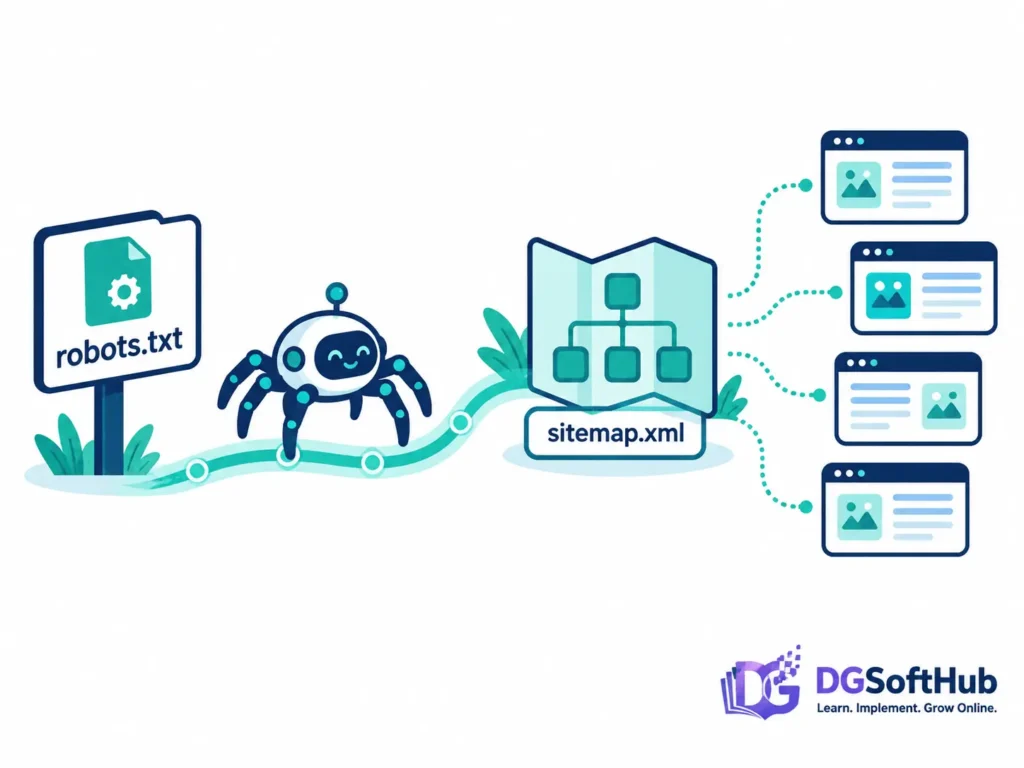
robots.txt — Your Site’s Bouncer
Your robots.txt file normally sits at yourdomain.com/robots.txt. It contains rules that tell compatible crawlers which parts of your site they may or may not crawl.
One of the most serious beginner mistakes is accidentally leaving a broad rule such as Disallow: / on a live website after development or testing.
Before assuming your site has an SEO problem, open your robots.txt file and check that it isn’t unintentionally blocking important pages or resources.
Also remember that robots.txt controls crawling. It isn’t the same thing as a noindex instruction. A URL blocked from crawling can still potentially be known to Google through other signals.
Google’s current documentation also notes that crawlers need access to important resources when those resources are required to render a page properly.
XML Sitemap — The Map You Hand to Search Engines
Your XML sitemap gives search engines a list of URLs that you want them to know about. It can make URL discovery easier, especially as your site grows.
It does not guarantee that every URL will be crawled or indexed. Google still evaluates each URL independently.
Submit your sitemap through Google Search Console and keep it updated through your CMS or SEO plugin.
One detail beginners often miss is the lastmod value. If your sitemap uses lastmod, it should represent a meaningful change to the content at that URL rather than simply changing every time you save a page.
Crawl Budget — Don’t Worry About It Too Early
Crawl budget is the amount of crawling a search engine can perform on a site over a given period. For a small website with a few dozen useful pages, it usually isn’t something you need to obsess over.
It becomes more relevant as websites become very large or contain large numbers of duplicate, low-value, unnecessary, or dynamically generated URLs.
For beginners, focus first on making sure your important pages are crawlable, internally linked, indexable, and included in your sitemap.
For a small WordPress site like DGSoftHub, I wouldn’t start by worrying about crawl budget. I’d first check whether Google can actually discover, crawl, and access the important pages. In most cases, those fundamentals matter far more than trying to optimize how often Googlebot visits a small site.
Step 2: Understand Crawling vs. Indexing
This is one of the most important technical SEO concepts to understand.
Crawling means a search engine accesses a URL and reads its contents.
Indexing means the search engine decides whether and how that content should be stored and potentially shown in search results.
So a sitemap doesn’t guarantee indexing, and making a page crawlable doesn’t guarantee that Google will choose to index it.
For example, a page may be crawlable but contain a noindex instruction. Or Google may crawl a page but decide that another URL is the more representative version of substantially similar content.
When a page isn’t appearing in Google, check both sides of the problem: Can Google crawl it? and Is Google allowed and willing to index it?
Step 3: Make Sure Important Pages Can Be Indexed
Once crawling is working, check the settings that determine whether your important pages are eligible for indexing.
Check for accidental noindex settings
A noindex directive tells search engines not to include a page in their search index.
That’s useful for pages you intentionally don’t want indexed. It becomes a problem when it is accidentally applied to an important article, product page, or category.
If a page suddenly disappears from search, inspect its robots meta settings and use Google Search Console’s URL Inspection tool to see how Google sees the URL.
Check Canonical URLs
A canonical URL helps indicate which URL should be treated as the representative version when similar or duplicate URLs exist.
For example, tracking parameters, filtered URLs, or multiple URL versions can sometimes create several addresses that point to essentially the same content.
Don’t use canonical tags simply because you’ve heard every page needs one. The important thing is that the canonical signal is clear and consistent with the page you actually want represented in search.
Check HTTP status codes
Your important pages should normally return a successful response such as 200 OK.
Deleted pages should generally return an appropriate error status such as 404 or 410, while permanently moved pages should use an appropriate 301 redirect.
Step 4: Core Web Vitals — The Speed Metrics That Matter
Core Web Vitals are Google’s real-user performance metrics for loading performance, responsiveness, and visual stability.
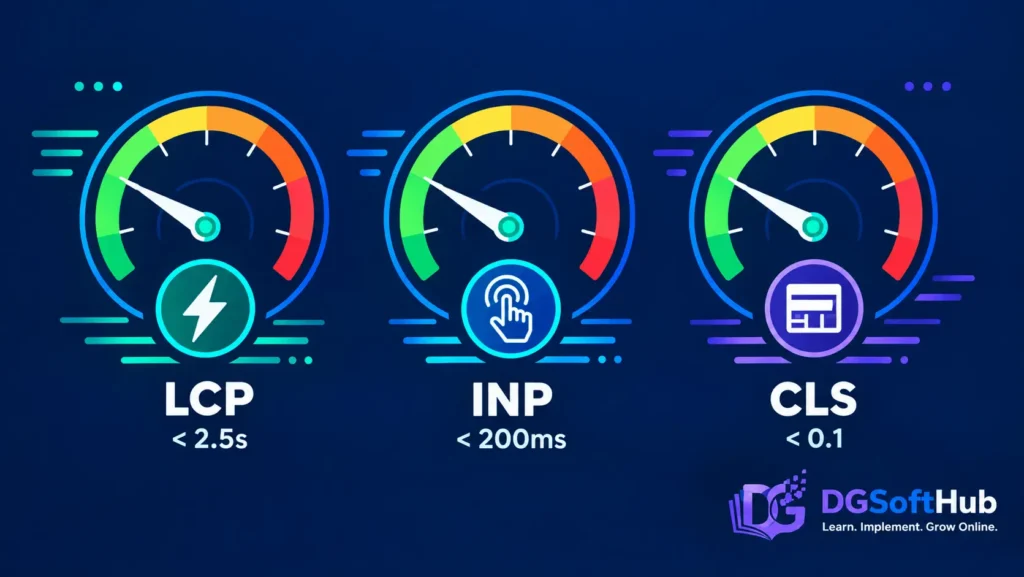
In 2026, the three Core Web Vitals are LCP, INP, and CLS.
- LCP (Largest Contentful Paint) — measures how quickly the main content becomes visible. A good score is 2.5 seconds or less.
- INP (Interaction to Next Paint) — measures how responsive a page is to user interactions such as clicks, taps, and keyboard input. A good score is 200 milliseconds or less.
- CLS (Cumulative Layout Shift) — measures unexpected movement of content while a page loads. A good score is 0.1 or less.
Here’s the part many beginners miss: a perfect Lighthouse score doesn’t automatically mean your real visitors are experiencing a perfect website.
Lab tests are useful for diagnosing problems. Field data shows how real users experience your pages when enough real-world data is available.
Use PageSpeed Insights and Google Search Console together. Look at the specific metric that is causing trouble rather than trying to push every score to 100.
Some practical improvements include:
- Compressing large images.
- Using modern image formats such as WebP where appropriate.
- Reducing unnecessary JavaScript.
- Loading non-critical resources later.
- Using appropriate image dimensions.
- Reserving space for advertisements and other dynamic elements so they don’t unexpectedly push content around.
DGSoftHub Pro Tip: Don’t spend hours chasing a perfect PageSpeed number if your real problem is a huge hero image, a slow plugin, or a layout shift caused by an ad slot. Fix the actual bottleneck first.
Step 5: Mobile-First Indexing — Check the Real Mobile Experience
Google primarily uses the mobile version of a site’s content for indexing.
That means your mobile page shouldn’t be treated as an afterthought.
Open your own blog on a real phone and check the page using an actual mobile connection. Don’t rely only on dragging the edge of a desktop browser until it becomes narrow.
Check that:
- Important content is visible.
- Headings aren’t cut off.
- Images fit the screen.
- Links and buttons are easy to tap.
- Menus work correctly.
- Nothing overlaps.
- Content isn’t accidentally hidden on mobile.
- Pages don’t jump around while loading.

Google’s systems can render JavaScript, so the simple rule isn’t “avoid JavaScript.” The better rule is to make sure important content, links, and structured information are available to search engines and users in the mobile experience.
Step 6: HTTPS and Basic Website Security
HTTPS should be standard for a modern website.
If your site still shows a browser warning such as “Not Secure,” check your SSL certificate and hosting configuration.
Also look for mixed-content warnings, where an HTTPS page attempts to load important resources over an insecure HTTP connection.
You don’t need to become a security engineer to handle basic website security. Keep WordPress, themes, plugins, and server software updated, use strong authentication, and make sure your hosting environment is properly configured.
For technical SEO purposes, think of HTTPS as part of having a secure, reliable website rather than treating security headers as a shortcut to better rankings.
Step 7: Structured Data — Help Search Engines Understand Your Content
Structured data is machine-readable information added to a page that helps search engines understand what the page represents.
For example, structured data can describe an article, breadcrumb trail, product, organization, profile, or other supported content type.
For a typical DGSoftHub blog post, Article and Breadcrumb structured data are especially relevant.
Your SEO plugin may generate much of this automatically. You don’t normally need to write JSON-LD by hand just to add basic article markup.

After implementing structured data, validate it with Google’s testing tools and check how Google sees the page. Structured data can help Google understand content, but it does not guarantee that a rich result will appear.
One important 2026 update: don’t add FAQ structured data simply because an article contains an FAQ section. Google removed the FAQ rich-result feature from Search in May 2026. You can still publish useful FAQ content for your readers, but don’t treat FAQ markup as a current Google rich-result strategy.
Step 8: The New Layer — Managing AI Crawlers
Search is no longer limited to traditional search engines. AI services can also access web content, and different services may use different crawlers for different purposes.
That means you shouldn’t treat every AI crawler as if it were the same thing.
Some crawlers are associated with model training, while others are used for search, retrieval, or other services.
For example, OpenAI documents OAI-SearchBot separately from its other crawlers. If you want your content to be discoverable through ChatGPT search, you should review OpenAI’s current crawler guidance and make sure your robots.txt and security systems aren’t unintentionally blocking the relevant crawler.
At the same time, don’t automatically allow every crawler simply because it calls itself an AI bot. Your robots.txt policy should reflect your own goals.
The important lesson is simple:
Review AI crawler access deliberately rather than copying a random robots.txt rule from another website.

What About llms.txt?
You may have come across llms.txt, a proposed file intended to provide information for AI systems.
It’s useful to know about, but don’t confuse it with robots.txt.
Google’s current documentation says that llms.txt isn’t needed for Google Search and does not affect Google Search visibility or rankings. You may still encounter the file on websites or use it for other systems that choose to support it, but it shouldn’t replace the fundamentals.
If you’re working on technical SEO, get your crawling, indexing, sitemap, page performance, mobile experience, and structured data basics right first.
Step 9: Duplicate Content, Redirects & Canonical Tags
A few smaller technical issues can cause unnecessary problems as your site grows.
Use canonical URLs correctly
When several URLs represent substantially similar content, a canonical signal can help indicate which URL should be treated as the preferred version.
Avoid unnecessary redirect chains
If URL A redirects to URL B and URL B redirects to URL C, you have a redirect chain.
Whenever possible, link directly to the final URL. Fewer redirects make crawling and page loading more efficient and make your site’s URL structure easier to maintain.
Check broken links
Run a broken-link check periodically. Tools such as Screaming Frog can help identify 404 pages, redirect chains, and other technical problems.
Don’t panic over every 404. Some 404s are normal, especially when a page has intentionally been removed. The problem is allowing important internal links to point visitors and crawlers toward URLs that should have been updated.
Your Quick Technical SEO Checklist
- robots.txt isn’t unintentionally blocking important pages or resources.
- XML sitemap is available, accurate, and submitted in Google Search Console.
- Important pages aren’t accidentally set to noindex.
- Canonical URLs are clear and consistent.
- Core Web Vitals are checked using real field data where available, not just Lighthouse.
- Important content works correctly on an actual phone.
- HTTPS is active with no important mixed-content problems.
- Relevant Article and Breadcrumb structured data are implemented correctly where appropriate.
- AI crawler access has been reviewed rather than copied from a generic robots.txt template.
- There are no unnecessary redirect chains.
- Important internal links don’t lead to broken URLs.
Related DGSoftHub Guides
If you want to build your SEO knowledge beyond the technical basics, these DGSoftHub guides are useful next steps:
Frequently Asked Questions
Do I need to hire a developer for technical SEO?
No, not for most beginner-level technical SEO work. Robots.txt, XML sitemaps, indexing settings, canonical URLs, structured data, and many performance improvements can be handled through WordPress, your SEO plugin, your hosting panel, or straightforward testing tools.
You may need developer help for deeper server, database, JavaScript, or infrastructure problems.
What’s the difference between technical SEO and on-page SEO?
On-page SEO focuses on the content and information on a page — things such as search intent, headings, keywords, internal links, and readability.
Technical SEO focuses on whether search engines can access, crawl, process, and understand your website properly.
You need both.
How often should I run a technical SEO audit?
You don’t need to perform a complete technical audit every week.
After the initial setup, check important technical areas regularly and investigate issues when they appear in Google Search Console, PageSpeed Insights, or your site monitoring tools.
A lighter review every one to two months is reasonable for a growing blog, especially when you’re publishing frequently or making significant website changes.
Do Core Web Vitals affect rankings?
Core Web Vitals are part of Google’s page-experience signals, but they are only one part of Google’s overall ranking systems.
Passing the thresholds does not guarantee higher rankings, and failing a metric does not automatically prevent a page from ranking.
Still, improving loading performance, responsiveness, and visual stability can make the site better for visitors.
Should I block AI crawlers like GPTBot?
Not automatically.
Different AI crawlers can have different purposes. Some site owners may want to limit certain forms of automated access, while others may want their content to remain discoverable through AI search or retrieval systems.
Review the policies of the relevant service and make your robots.txt rules match your own goals.
Do I need an llms.txt file?
Not for Google Search.
Google’s current documentation says that llms.txt isn’t needed for Google Search and does not affect Google Search visibility or rankings.
You may still encounter it as an experimental or service-specific file, but it should not distract you from the technical SEO fundamentals that apply to your actual website.
What’s the easiest first fix for a beginner?
Start with the basics.
Open your robots.txt, check your XML sitemap, inspect one important URL in Google Search Console, and test the page on a real phone.
Those simple checks can reveal surprisingly important problems.
Is HTTPS still necessary in 2026?
Yes. Your website should use HTTPS with a valid SSL/TLS certificate.
Also check for mixed-content problems and make sure important resources load securely.
What You Should Do Next
- Open Google Search Console and check your Core Web Vitals report. Note which metric, if any, needs attention.
- Visit yourdomain.com/robots.txt and confirm that important pages and resources aren’t unintentionally blocked.
- Check that your XML sitemap exists and is submitted in Search Console.
- Inspect one recent article in Google Search Console and check its indexing status.
- Check the page’s canonical URL and make sure it points to the version you actually want represented.
- Review your SEO plugin’s structured-data settings and confirm that appropriate Article and Breadcrumb markup is being generated.
- Review your robots.txt rules for relevant AI crawlers and decide what access matches your website’s goals.
- Open your blog on your actual phone and click through three random posts. Look for layout, navigation, loading, and readability problems.
Don’t try to fix everything at once. Technical SEO becomes much easier when you work through the problems one by one, starting with the issues that affect your most important pages.
About the Author
Muhammad Arif Hussain is a digital marketer and founder of DGSoftHub, a platform dedicated to digital products and practical online business guides. With hands-on experience in SEO, blogging, and building websites from scratch, he writes from what actually works — and what doesn’t — rather than recycled theory.
DGSoftHub — practical guides on SEO, digital marketing, AI, blogging, WordPress, and freelancing, for people building an online business one step at a time.