How to Find Low Competition Keywords (Even If You’re Starting From Zero)
I still remember the first time I published a post and genuinely expected it to take off. I’d spent a whole weekend on it, shared it everywhere I could think of, and then… nothing. A few visitors a day, mostly people I knew personally clicking the link out of pity. The reason? A lack of awareness about low competition keywords.
It wasn’t the writing. It took me embarrassingly long to figure that out. The problem was I’d gone after a keyword that sites with ten years of authority and a hundred-person content team had already locked down. A brand-new blog has roughly zero chance against that, no matter how good the article is.
That’s the whole case for low competition keywords. You’re not settling for “easier” topics out of laziness — you’re being strategic about where you can actually win.
What “low competition keywords” actually means
A low competition keyword is just a search term that fewer sites are seriously trying to rank for. Less competition, more room for a new or smaller site to show up on page one.
Take something broad like digital marketing. Every agency, every SaaS company, every marketing blog on earth has content targeting that phrase. Now compare it to digital marketing tools for local businesses — way fewer searches, sure, but also way fewer sites built specifically to answer it. That gap is where you live, at least at first.
Most blogs that actually grow don’t do it by landing one big keyword. They do it by picking off dozens of these smaller, specific opportunities one at a time until the site starts to carry some weight of its own.
Why this matters more when your site is new
Google doesn’t know anything about you yet. No track record, no backlinks, no signal that you’re worth trusting on the topic. Trying to outrank an established site on a competitive term in that position is mostly wasted effort.
Smaller keywords give you a fair fight instead. They tend to:
- Be realistic to rank for without years of history behind you
- Bring in visitors who are searching for something specific, not browsing
- Add up — one post at a time — into real topical authority
- Get you traffic and feedback faster, which matters for momentum
Almost every blogger I’ve talked to who got their first real traction got it from a long-tail phrase they almost didn’t bother writing about, not from the big, obvious keyword they were originally chasing.
When I was building content for DgsoftHub, I initially focused on broader topics because they looked more attractive in keyword tools. Later, I shifted toward more specific searches such as “best AI tools for beginners” and noticed those pages started gaining impressions much sooner. That experience taught me that realistic keywords usually outperform ambitious ones when you’re growing a new website.
Finding them, step by step
Start with topics, not keyword tools
The instinct most beginners have is to open a keyword tool first and start typing random guesses. Flip that. Start with the handful of topics your audience actually cares about — for an SEO-focused blog that might be things like SEO basics, content marketing, email, social, AI tools — and let keyword ideas come out of those topics, not the other way around.
Let Google finish your sentences
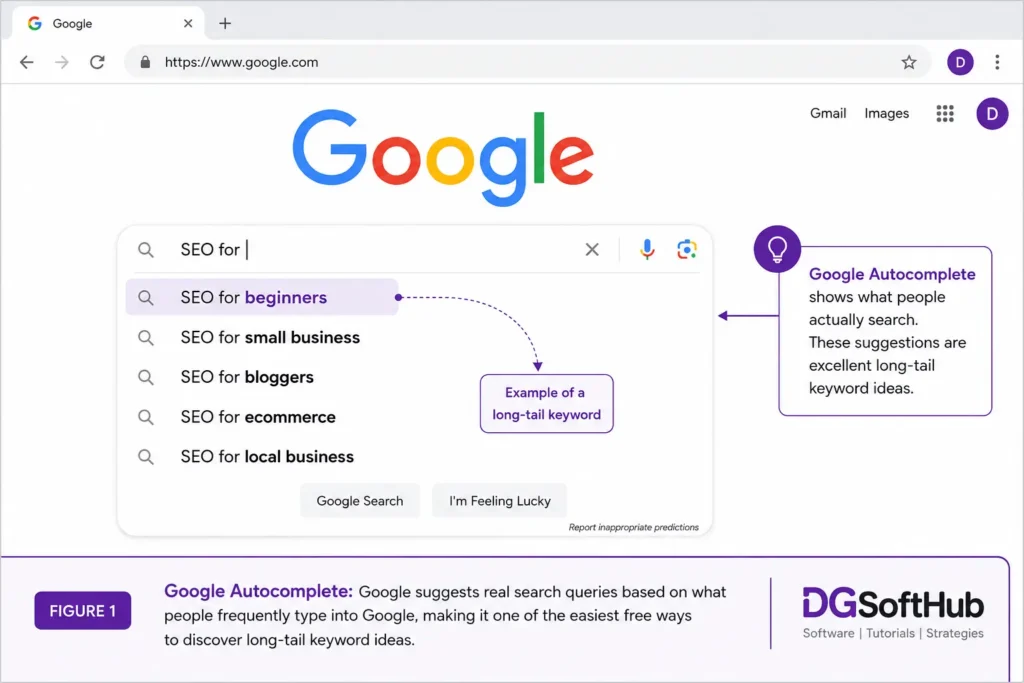
Google’s autocomplete is free, and it’s pulling from real searches people are typing right now, which makes it more honest than most paid tools. Type something half-finished — “SEO for,” “SEO tools for,” “SEO tips for” — and look at what it fills in. Those suggestions are basically a crowd-sourced list of long-tail ideas handed to you for nothing.
Read what’s already in “People Also Ask”
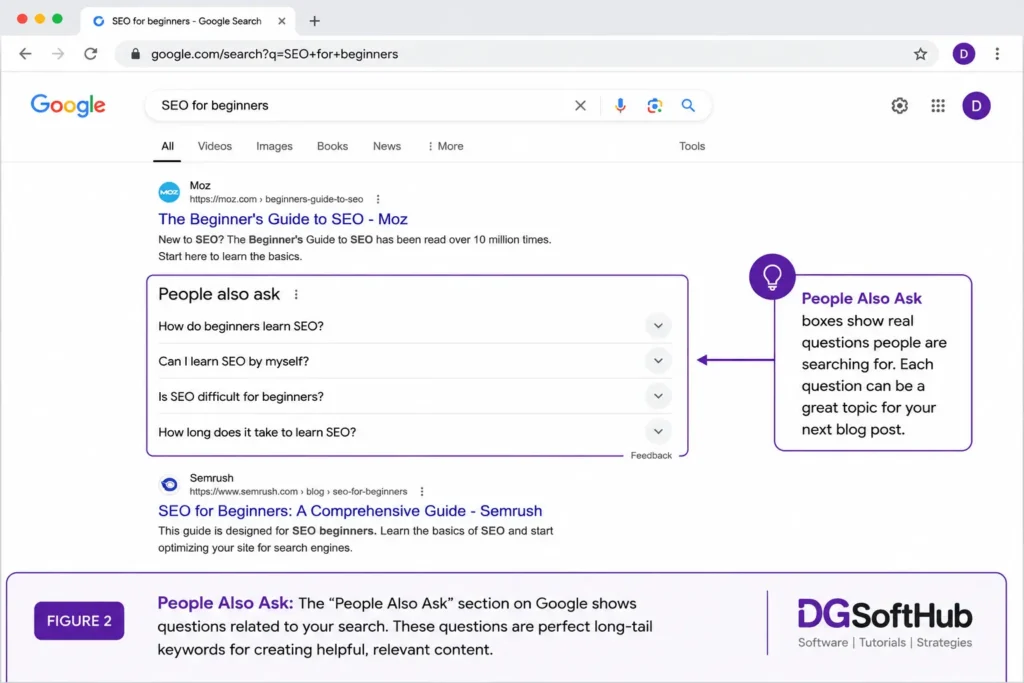
Search any topic and scroll to the PAA box. Questions like how do beginners learn SEO or can SEO be self-taught are sitting right there, and most of them make a perfectly good standalone post. I’m genuinely surprised how often people skip past this box entirely — it’s one of the easiest sources of low competition ideas on the page.
Bring in a proper tool to verify
Autocomplete and PAA are great for ideas, but you still want a tool to check actual numbers before committing a few hours to an article.
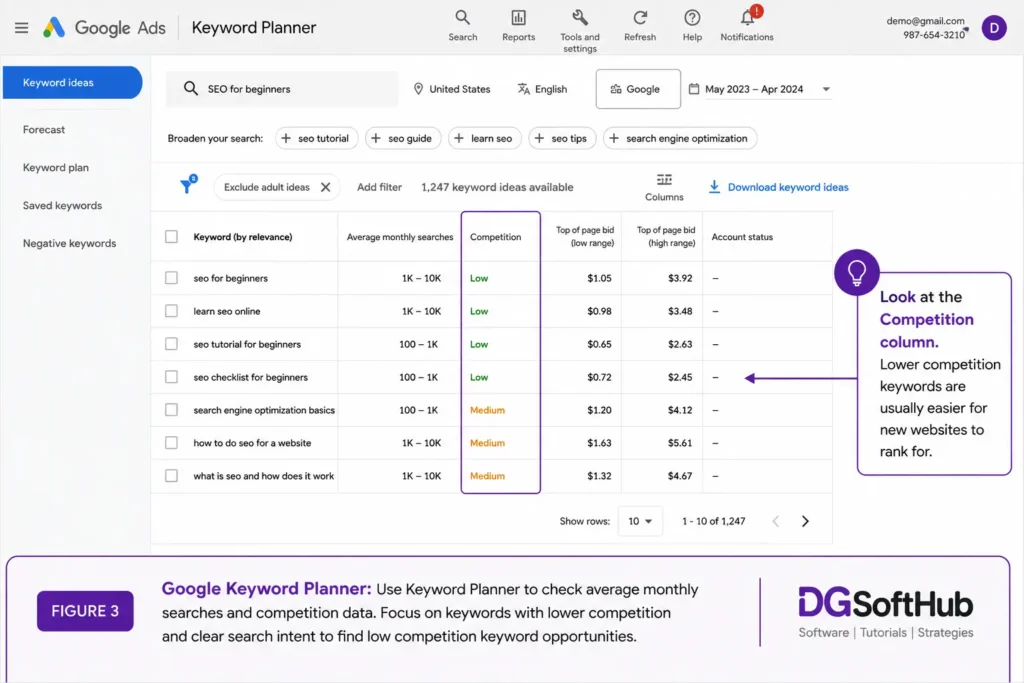
Google Keyword Planner will give you volume estimates and competition data. Don’t fixate on the highest-volume option in the list — a keyword pulling 100 searches a month with clear intent can outperform one with 5,000 searches and no real buying or reading intent behind it.
Ubersuggest is a friendlier entry point if Keyword Planner feels like overkill at first. It scores difficulty in a way that’s easy to read at a glance, which makes it simple to filter for the easier wins.
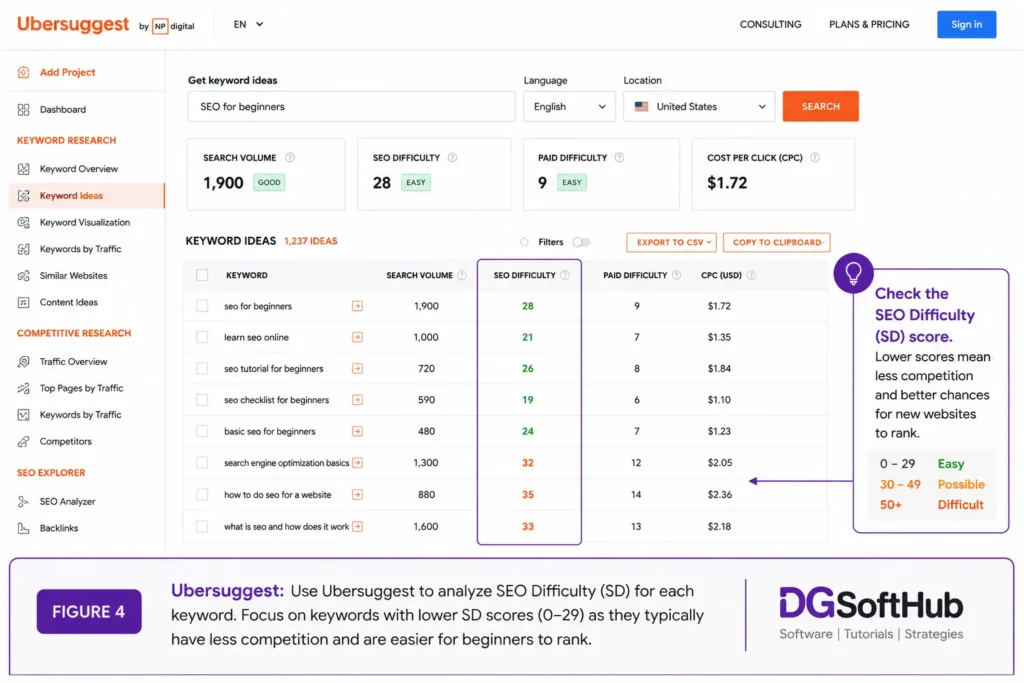
AnswerThePublic is worth a look specifically for question-based, long-tail phrasing — the kind of oddly specific stuff bigger sites rarely bother targeting.
Go longer and more specific than feels natural
There’s a pull toward writing about “SEO tools” because it sounds more important than “best SEO tools for beginners with free plans.” Resist it. The longer, more specific version usually has a clearer searcher behind it, an easier path to ranking, and — somewhat counterintuitively — a better shot at actually converting that visitor into a reader, subscriber, or customer.
Actually look at who’s ranking before you commit
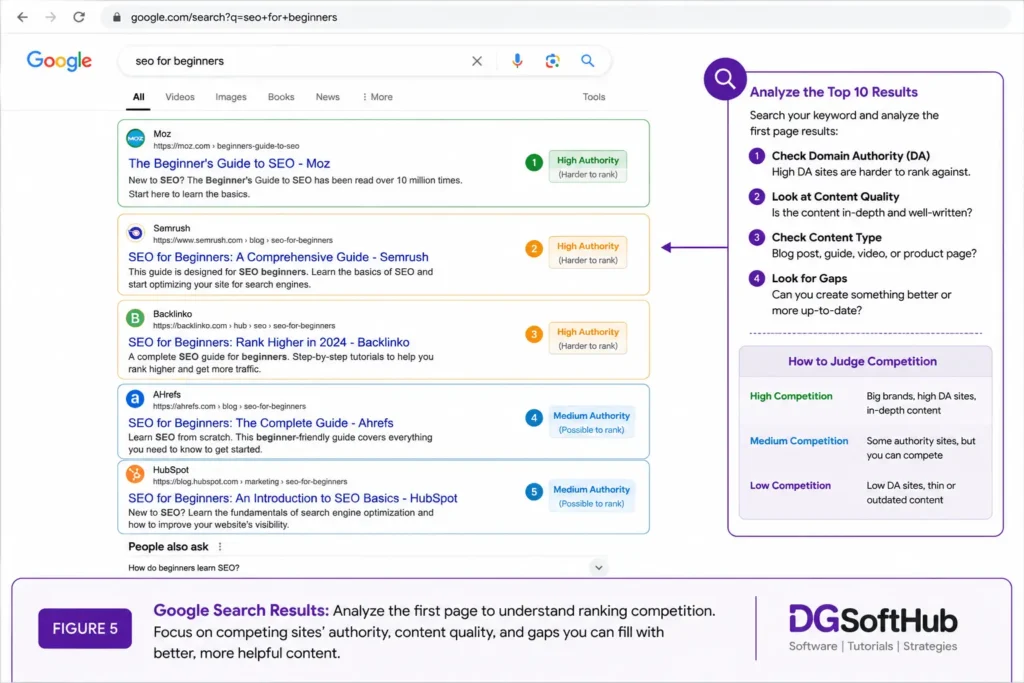
This is the step people skip, and it’s the one that saves the most wasted effort. Before you write anything, search the keyword and look at page one with a critical eye. Is it wall-to-wall enterprise sites and major publications? Or are a few independent blogs and smaller sites mixed in? If you see content that’s thin, outdated, or clearly phoned in, that’s often your opening — you can simply do it better.
Mistakes I see constantly
Chasing volume and ignoring everything else. A keyword with 10,000 monthly searches looks great on paper. It means nothing if you have no realistic shot at the top page for it.
Skipping search intent. Someone typing “best SEO tool for beginners” wants a recommendation. Someone typing “what is SEO” wants a definition. Writing the wrong kind of content for the intent behind a search is one of the fastest ways to do real keyword research and still get nothing for it.
Writing first, researching never. Even five minutes with autocomplete and a quick look at page one beats publishing on a hunch.
Going after broad terms way too early. A new site doesn’t need to rank for “SEO.” It needs a string of smaller wins that, over time, earn it the right to compete for bigger ones.
The process I actually use
- Pick a broad topic area
- Pull ideas from Google autocomplete
- Check the People Also Ask questions on related searches
- Verify volume and difficulty in Ubersuggest or Keyword Planner
- Look at who’s currently ranking on page one
- Pick the keywords where smaller sites are already competing
- Write something that actually answers the question, properly
Nothing groundbreaking here. It’s just consistent, and consistency is most of what’s missing from beginner keyword research.
You might also find these useful:
- How to Start Digital Marketing with Zero Investment
- Best Free Tools for Digital Marketing Beginners (2026 Guide)
- Complete Guide: Best Freelancing Platforms
Want Faster Growth?
grab the templates and tools I actually use to get a new site moving faster.
Frequently Asked Questions
What are low competition keywords?
Search terms with fewer sites actively competing for them — which makes them realistic targets for newer or smaller websites.
Are they actually good for a new site?
Yes, usually the best option you have early on. They’re how most small sites earn their first real traffic and rankings.
How many should I target per post?
One primary keyword per article, with related phrases worked in naturally as you write — don’t force a list of keywords into one piece.
Which free tools are worth using?
Google Autocomplete and the People Also Ask box cost nothing and are genuinely useful. Pair them with Ubersuggest or Keyword Planner to check the numbers before you commit to writing.
Can low competition keywords really move the needle?
Individually, not always much. Stacked over twenty or thirty articles, they add up to more traffic than most people expect — and it tends to be better-qualified traffic, too.
Where to actually start
If you’re early on, stop trying to out-muscle the biggest sites in your space — you won’t win that fight yet, and trying wastes the time you don’t have to spare. Open autocomplete, type in a topic, look at who’s actually ranking for the suggestions, and write for the gaps you find.
The goal was never to find the biggest keyword. It’s to find the one you can win today, and let that compound from there.
Muhammad Arif Hussain is a digital marketer and the founder of DGSoftHub, where he writes practical guides on digital products, freelancing, and content strategy. You can find more of his tools and resources at dgsofthub.com.